Save points of view
This dialog saves camera positions in the current document to a file that Generate video can read, creating an animated sequence passing through all the points.
Clicking the icon changes the document view to Perspective view, the most natural way to watch the resulting video. A floating dialog appears, allowing you to move the document view with MDTopX's other display tools.
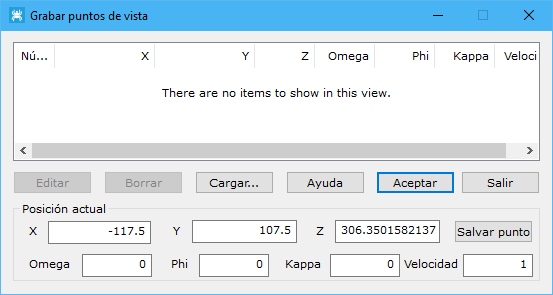
The dialog displays added positions, loads a previously saved position file, and saves the current list.
As new positions are added, camera-shaped icons appear in the document view, showing their positions relative to the object.
The dialog offers the following information and actions:
- Position list: saved positions, comprising viewpoint XYZ coordinates, Omega, Phi and Kappa orientation angles, and transition Speed to the next point. Speed defaults to 1. Buttons at the lower left Edit or Delete positions and Load... an existing position file.
- Current position: position fields, updated automatically as the current document view moves. Once the desired position is reached, click Save point to add it to the position list.
When finished adding positions, click OK. The program lets you save the current position list under a file name for later use to generate a video. Click Exit to close the tool without saving data.
The saved file has the following format, with coordinates in meters and angles in degrees:
Pos_X Pos Y Pos Z Omega Phi Kappa Velocidad
424659.717158 4495290.075556 947.157008 53.629147 358.381150 1.202846 1.000000
424722.469129 4495283.604271 977.601514 53.629147 358.381150 1.202846 1.000000
424760.150146 4495236.889819 947.916648 53.629147 358.381150 1.202846 1.000000
424719.233509 4495167.257396 970.378476 53.629147 358.381150 1.202846 1.000000
424644.706598 4495152.940141 997.370347 53.629147 358.381150 1.202846 1.000000
424712.912964 4495222.521317 1043.623561 15.768020 358.105439 1.976395 1.000000