Cameras
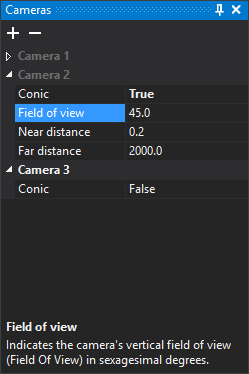
This pane defines cameras used to display the drawing in perspective in the drawing window. Each camera is a named group. The active camera's name uses the theme's text color (white in the dark theme); the others are gray. Click a name to activate another camera. Clicking only activates it if a drawing window is open.
At startup the pane has one camera, Camera 1, with orthogonal projection.
Toolbar
- Add camera (+): adds a camera with the active camera's parameters and activates it.
- Delete camera (−): deletes the selected camera after confirmation. If none is selected, deletes the active camera. The last camera cannot be deleted.
Fields for each camera
- Conic: whether projection is conical (True) or orthogonal (False). The next three fields appear only for conical cameras.
- Field of view: vertical field of view in sexagesimal degrees. Default: 45.
- Near distance: camera-to-near-plane distance. Anything closer is not rendered. Default: 0.2.
- Far distance: camera-to-far-plane distance. Anything farther away is not rendered. Default: 2000.
Showing the pane
Select Window/Cameras.