Could not connect to the specified dongle
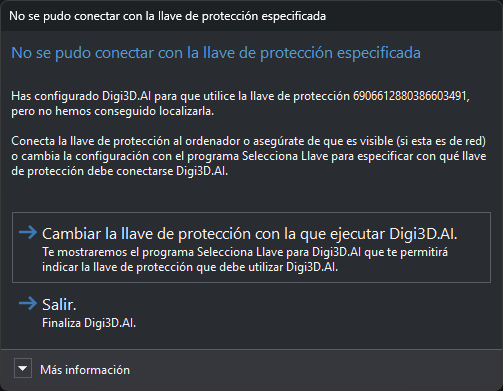
We could not connect to the dongle configured for the program displaying this error.
It appears when the program's Select dongle utility specifies a particular dongle that cannot be found.
Possible causes and solutions:
| Cause | Solution |
|---|---|
| The specified dongle is disconnected or inaccessible. | Connect it to the computer displaying the error.; A hardware dongle's LED should light to indicate Windows recognized it.; For a network dongle, ensure its server is visible from the computer running the program. |
| The specified temporary dongle has expired. | Temporary dongles last up to 90 days from first use. After expiration, convert it to a permanent dongle. |
| All connections to the specified network dongle are in use. | Wait for another user to finish using the program or purchase another activation for the network dongle. |
| The program's dongle configuration is incorrect. | Run that program's Select dongle and choose the correct one. |
Dialog contents
- Text: configured dongle identifier.
- More information: reminds you to activate the computer in that dongle with Activate computer if it is the desired one.
Buttons
Digi3D.AI shows this at startup. The code table editor (DigiTab) shows the same dialog with identical text, because it uses Digi3D.AI's configured dongle.
- Change the dongle used to run Digi3D.AI.: opens Select dongle and closes the program showing the dialog. After selecting a dongle, run the program again.
- Exit.: closes the program showing the dialog.