Finding transformations between coordinate reference systems
Digi3D.AI sometimes needs to transform coordinates between different coordinate reference systems. It must find a mathematical transformation between the two systems to do so.
The EPSG database includes a list of possible mathematical transformations between two coordinate reference systems.
Digi3D.AI queries the EPSG database whenever it needs to find a transformation between two coordinate reference systems. If it finds a transformation in that database, it uses it to convert coordinates between the systems.
Transformations specified in the EPSG database are always between:
- 2D horizontal systems and 2D horizontal systems.
- 3D horizontal systems and 3D horizontal systems.
- 3D horizontal systems and vertical systems.
- Vertical systems and vertical systems.
The EPSG database does not define direct transformations between compound systems. Digi3D.AI finds the horizontal and vertical transformations needed to transform coordinates between compound systems separately, and concatenates them.
If either system is compound, such as ED50 / UTM Zone 30N + EGM96 height, Digi3D.AI finds the horizontal and vertical transformations separately and concatenates them into one transformation.
Transformations do not exist between every coordinate reference system. For example, there is no transformation between the horizontal systems ED50 / UTM Zone 30N and NAD83(NSR2007) / Florida East (ftUS).
If Digi3D.AI finds no horizontal coordinate reference system transformation, it displays an error message. If it finds no vertical transformation, you can specify a generic transformation.
Three situations can arise when Digi3D.AI tries to find a transformation between two systems:
A single transformation is found.
If Digi3D.AI finds a single transformation between the two coordinate reference systems, it uses that transformation without requesting your intervention.
No transformation is found.
When looking for a horizontal transformation, Digi3D.AI displays a task dialog with the transformation engine's error message and the two system names, and cancels the operation requiring the transformation. The same dialog appears if no vertical transformation is found and you cancel Vertical transformation selection, described below.
The dialog depends on which systems lack a transformation:
- Between the drawing window and a drawing file. Located an error when creating a transformation between two reference coordinate systems appears ("Unable to create the transformation or no valid transformation has been located"). More information shows both systems' EPSG codes and names, and suggests selecting Local for the drawing window. Digi3D.AI does not load the drawing file: if it is the file opening the drawing window, the window does not open; if it is a reference file, it is not added.
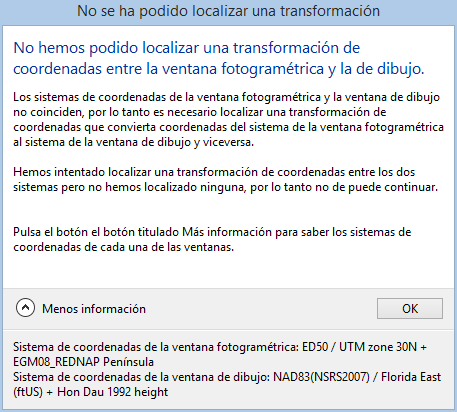
- Between the photogrammetric window and drawing window. Unable to locate or create a transformation appears. If the drawing window was being opened, it does not open. If a model was being loaded with the drawing window open, the model does not load.
The following screenshot shows the first case. The drawing window's system is ETRS89 / UTM zone 30N + EGM96 height. The drawing file's system is ETRS89 / UTM zone 30N + Local vertical coordinate system. Digi3D.AI assigns this local vertical system to every drawing file whose system has no vertical component. There is no transformation between EGM96 height and a local vertical system, and Vertical transformation selection was canceled, so the file does not load.
When looking for a vertical transformation instead, Digi3D.AI displays Vertical transformation selection.
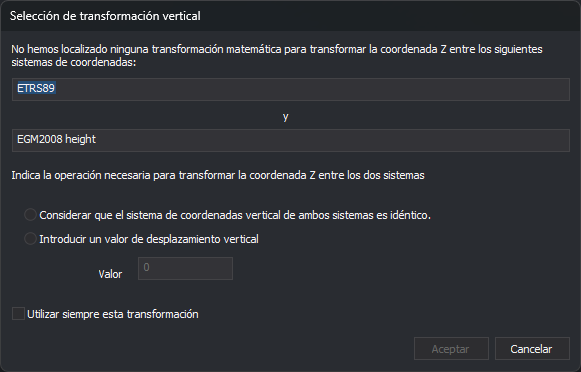
The dialog contains these controls:
- Coordinate systems. The two read-only text fields, separated by "and", show the source coordinate system's name (upper field) and destination system's name (lower field).
- Consider the vertical coordinate system of both systems is the same. Choose this option if Z does not change between the systems. Digi3D.AI creates a vertical transformation with a shift of 0, so destination Z equals source Z.
- Enter a vertical shift value. Choose this option if destination Z is obtained by adding a fixed value to source Z. Selecting it enables Value.
- Value. Enter the vertical shift, which can be negative. Digi3D.AI calculates destination Z as source Z plus this value. In the reverse direction, from destination to source, it subtracts the value. The field is disabled until you choose the shift option, and becomes disabled again if you choose identical systems.
- Always use this transformation. Select this checkbox so Digi3D.AI remembers the chosen transformation for this coordinate system pair, in this source-to-destination order. The next time it needs the vertical transformation between these systems, it applies it without displaying the dialog. If unchecked, the dialog appears whenever Digi3D.AI needs this transformation.
- OK. Disabled until you choose either option. Clicking it makes Digi3D.AI create the vertical transformation with the specified shift.
- Cancel. Closes the dialog without creating a transformation or remembering anything. The operation requiring the transformation decides what to do next.
Digi3D.AI saves the memorized transformation in the current user's Windows registry, in the
wktvalue underHKEY_CURRENT_USER\Software\Digi21\Digi3D.NET\App\TransformacionesMemorizadas\<sistema de origen>\<sistema de destino>. The shift is stored with 6 decimal places.Digi3D.AI provides no command or dialog to undo this choice. To show the dialog again for that system pair, open Windows Registry Editor and delete the
<sistema de destino>key at that path.Several transformations are found.
If Digi3D.AI finds several transformations between the two coordinate reference systems, it displays Several transformations located.