User interface
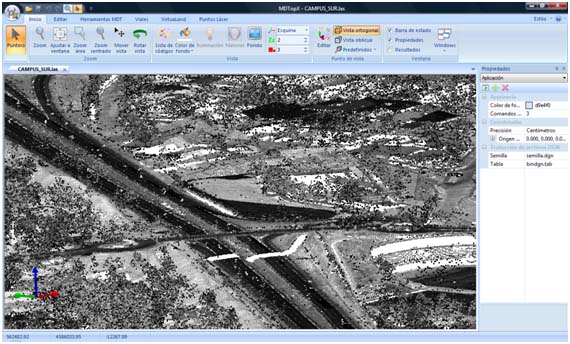
The program is a graphical multiple-document application, allowing you to open more than one file per session. The interface replaces toolbars and user menus with the ribbon. Access the traditional File menu by clicking the  .
You interact with displayed drawing elements using the mouse. Moving within a document window displays the coordinates beneath the cursor in the status bar.
When a command requires element selection, use the left mouse button. The program searches for entities near the current cursor position.
If it finds an entity, it highlights it in another color and asks you to confirm selection and execute the command (click the left mouse button again), reject the selection and search for more entities in the same area (click the right mouse button), or end the search (press [ESC]).
If your mouse has a center wheel, use it to zoom the current view in or out.
The status bar displays information about the selected tool and prompts from the program.
It also displays the cursor's coordinates. For a digital terrain model or vector drawing, it shows real-time coordinates. For a raster file, it shows the pixel color.
Application panes may also appear in the main window, showing information about the current tool or active document. You can show or hide these panes, keep them fixed in the current view or hide them automatically when unused.
Change the program's appearance by selecting a style (blue, black, silver or aqua) from Style in the upper right corner.
To the right of Style is Help, represented by  . It provides:
- Help topics: displays program help. Clicking an element shows information about it. Clicking elsewhere on screen shows general program information. You can also press F1.
- About MDTopX...: displays MDTopX version information, including its compilation date and the end date of your technical support and updates service. After that date, do not install newer versions, because they will not work with your current license. A button also checks for newer versions on the Digi21 server.
See also: