Shading
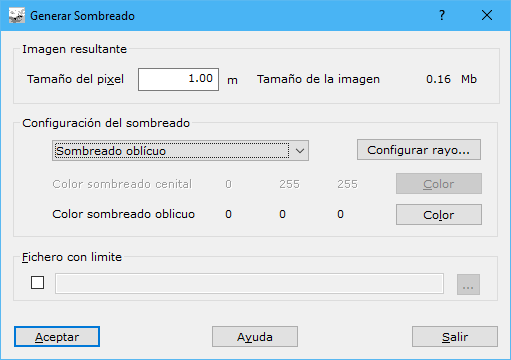
Complete these fields:
- Pixel size: pixel size in meters for the raster shading map. Larger pixels reduce image quality, but excessively small pixels increase memory and disk requirements.
- Configuration: shading type: Zenithal, Oblique or Combined.
- Ray configuration...: opens a dialog configuring the ray for oblique or combined shading.
- Slope shading colour: color for zenithal lighting.
- Oblique shading colour: color for oblique lighting.
- Limit file: optional file defining the shading area. Formats: DIGI BIN, AutoCad DXF, MicroStation DGN or ASCII coordinates defining the boundary. The boundary can contain one or more closed lines; ASCII supports only one line.
For Combined shading, warm colors such as pink or yellow are recommended for zenithal shading and cool colors such as blue or purple for oblique shading.
Requires an active triangulated digital model document.