Toolbox
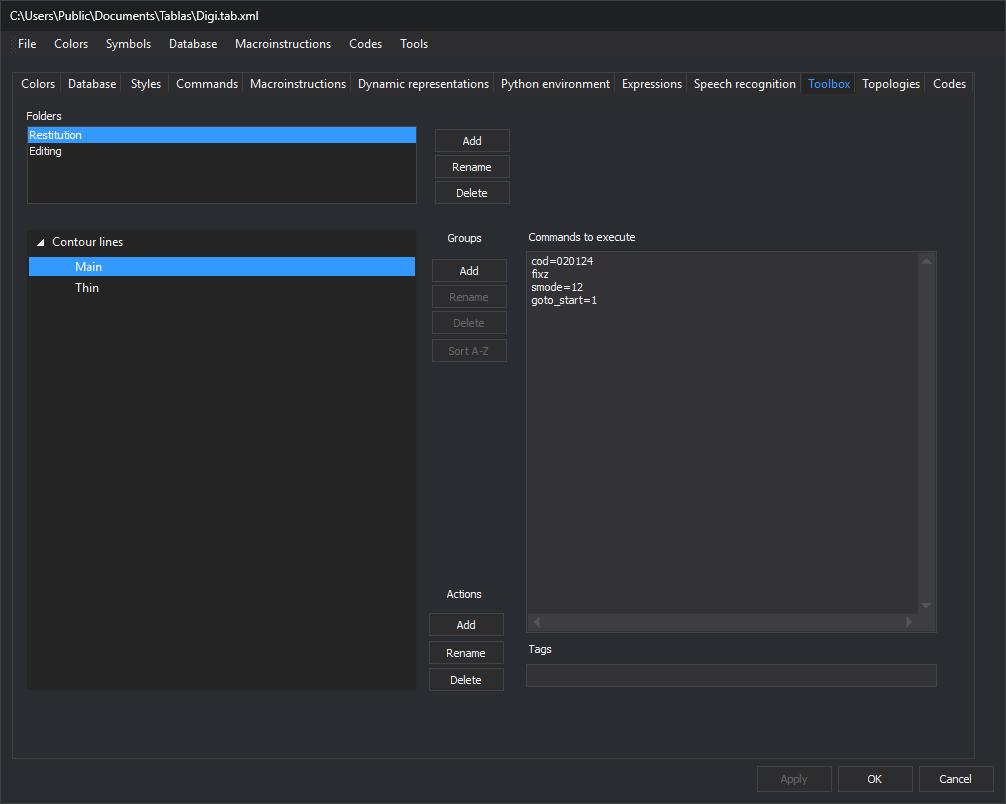
Configures Digi3D.AI's Toolbox when the drawing window uses this code table. Folders contain groups, which contain actions. An action is a pane button running a command list.
Folders
- Folders: code table folders.
- Add: requests a new folder name. Existing names are not added.
- Rename: opens Rename folder with the selected name.
- Remove: deletes the folder, groups and actions.
Groups and actions
The left pane shows selected folder groups and their actions.
Groups buttons: Add requires a selected folder; Rename, Remove and Sort A-Z require a selected group header, not an action:
- Add: requests a new group name. Case-insensitive duplicates in the folder are not added.
- Rename: opens Rename group with its name.
- Remove: deletes the group and its actions.
- Sort A-Z: sorts group actions alphabetically.
Actions buttons:
- Add: requests a new action name and appends it to the selected group or the selected action's group.
- Rename: opens Rename action with the selected name.
- Remove: deletes the action.
Renaming folders, groups or actions and adding actions do not check for duplicates. Deleting any of them requires no confirmation.
Commands to execute and Tags
Selecting an action enables:
- Commands to execute: one per line. Empty lines are discarded.
- Tags: action tags.
Apply or OK applies changes. Switching tabs retains them unapplied. Cancel closes the editor without applying them.