Code display
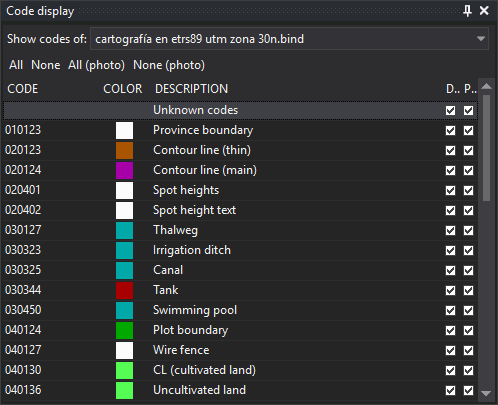
This pane enables or disables each code's display separately in the drawing and photogrammetric windows, for each loaded drawing file.
Toolbar
- Show codes of:: drawing file whose codes are shown. The drop-down contains the main drawing file and loaded reference files.
- All and None: enable or disable all file codes in the drawing window.
- All (photo) and None (photo): enable or disable all file codes in the photogrammetric window.
Columns
- Code: code name.
- Color: code color in the code table.
- Description: code description in the code table.
- Drawing window: checkbox enabling or disabling code display in the drawing window.
- Photogrammetric window: checkbox enabling or disabling code display in the photogrammetric window.
Codes shown
- If the drawing file accepts new geometries, all code table codes appear, so a code can be disabled before any geometry uses it.
- If the file is read-only or cannot store geometries, such as a WMS server connection, only codes from its geometries appear. A WMS connection has no geometries, so its list is empty and the pane displays “This drawing file has no geometries.”
- Adding a geometry with an unlisted code adds that code to the list.
- Codes absent from the code table are omitted.
Showing the pane
Show it in either way:
- Select Window/Code display.
- Press Alt+Shift+V.
The Panes toolbar has no button for this pane.
Related commands
The same operations are available through OND, OFFD, ONS and OFFS.