Object information
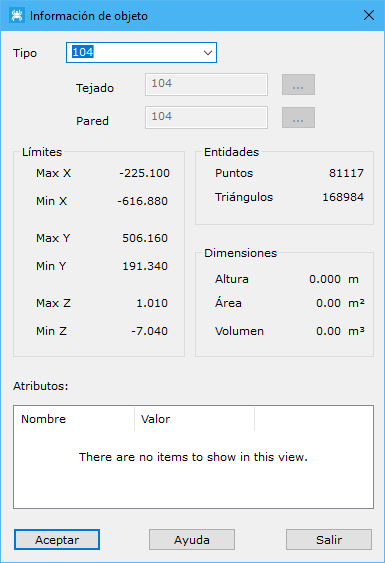
This dialog displays and edits the properties of an object included in the DTM. The tool requests that you select the object graphically with the left mouse button. Left-click again to confirm and display a dialog with the following information:
- Type: object type, with Building, Bridge and Tree as options.
- Roof: code for the triangles generated on top of the object. The button to the right opens the program's stored Code list.
- Wall: code for vertical triangles generated down to the object's projection on the DTM. The button to the right opens the program's stored Code list.
- Limits: maximum and minimum coordinates occupied by the object.
- Entities: number of points and triangles in the object.
- Dimensions: height above the digital model, total object area and object volume.