Quality control scripts
Digi3D.AI quality controls are Python functions stored under Python environment in the codes table. Each code assigns its functions in Quality controls to apply (Code properties).
No .NET assembly is compiled: Digi3D.AI's Python interpreter executes Python environment contents whenever the codes table loads or changes, and calls functions assigned to each code.
See Python quality controls for the language reference. Guiones-Control-Calidad-Python-Digi3D provides 64 ready-to-use controls described in Python quality control repository.
When they run
- During digitizing. With QUALITY_CONTROL_ON_ENTITY_END enabled (Quality control/Analyze quality control when an entity is finished) and Analyze quality control when digitizing set to Yes, runs the code's controls before saving the geometry. Each function receives
adding_geometry=True. - On demand. QUALITY_CONTROL_COD, QUALITY_CONTROL_VISIBLE_ENTITIES, QUALITY_CONTROL_SELECTION and Quality control menu options run each analyzed geometry code's controls regardless of Analyze quality control when digitizing. Each function receives
adding_geometry=False.
A multicoded geometry is analyzed once per code, passing its index as code_index.
How Digi3D.AI reports errors
During digitizing:
A geometry error (
GeometryErrororGeometryRelationError) opens Quality control error with the error message and Store the geometry / Do not store the geometry. If coordinates are supplied, Store the geometry moves the view there. Do not store the geometry discards it and displays the message in a balloon.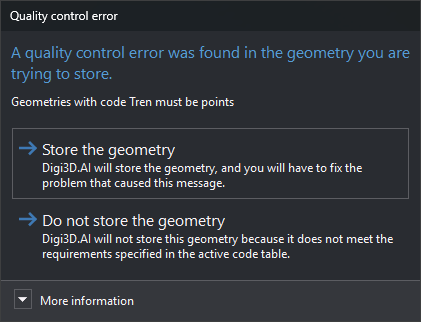
A warning (
GeometryWarning) appears in a balloon and the geometry is saved.A database field error (
DatabaseFieldError) opens a dialog to correct the field value. Cancelling prevents storage. Correcting the value reruns that code's controls; geometry errors and warnings with messages already shown are not displayed again.
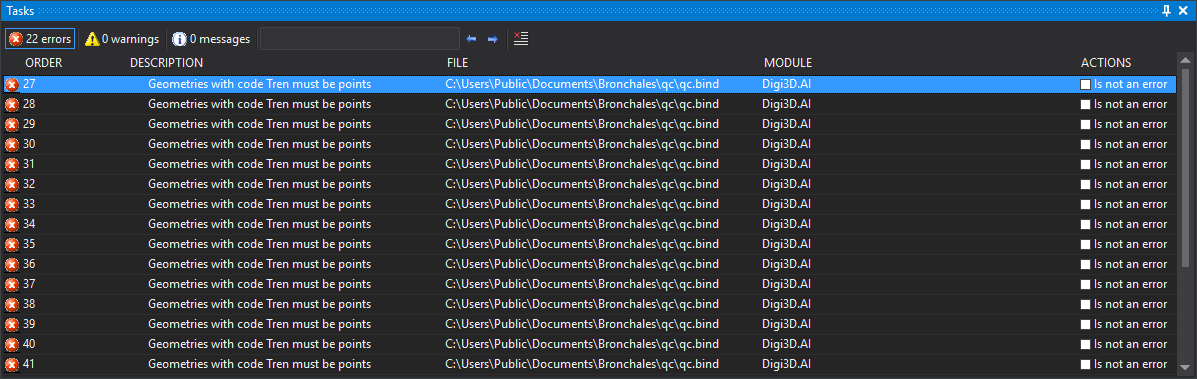
On demand, each error and warning becomes a task pane entry. Double-click to move to the error coordinates or geometry.
Pages in this section
- Creating a quality control script: declaring a function and assigning it to a code.
- Error types: return values and their effects.
- Quality control examples.