MODIFY_MODEL_PARAMETERS
MODIFY_MODEL_PARAMETERS manually changes the positions and rotations of both cameras in the conical camera model loaded in the photogrammetric window. The images reflect changes as you edit the parameters.
Parameters
None.
Modify model orientation pane
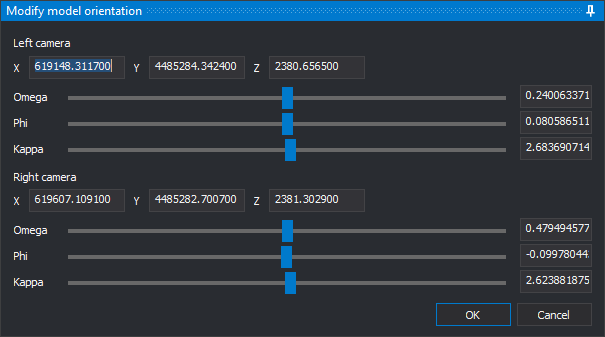
The pane has one group of controls for the Left camera and another for the Right camera. Initial values come from the model's relative orientation.
- X, Y, Z: projection center coordinates in the model coordinate system.
- Omega, Phi, Kappa: camera rotations in degrees, applied in omega, phi, kappa order. Each rotation has a slider and a field. Rotations range from -180 to 180 degrees. Sliders move in 0.01-degree steps; fields accept any value within the range.
Each change applies to the images immediately, whether you move a slider or enter a valid value. While a field contains nonnumeric text or an out-of-range rotation, for example while you type the minus sign of a negative value, the images remain unchanged.
- OK: validates all twelve fields and ends the command. If a field is invalid, displays a message and leaves the pane open. The changed orientation is used while the model is loaded; it is not saved in the orientation files.
- Cancel: restores both cameras to their orientation when the command started and ends the command.
If you run another command while this pane is open, clicking OK or Cancel plays the error sound. Neither button performs any action until the other command finishes.
Command characteristics
| Command type | Interactive command |
|---|---|
| Repeats automatically | No |
| Menu option | Photogrammetric window/Modify model orientation (option added by the conical camera sensor) |
| Toolbar | This command has no associated toolbar button |
| Extension | Digi3D.ConicSensor.dll |
| Implementation | Native |
| Related variables | No related variables |
| Related commands | RELATIVE_ORI CAMERA_ROTATIONS |
| Internal name | {22F02A11-BB26-444D-89B3-43D0F41803CB} |