Projection onto a DTM
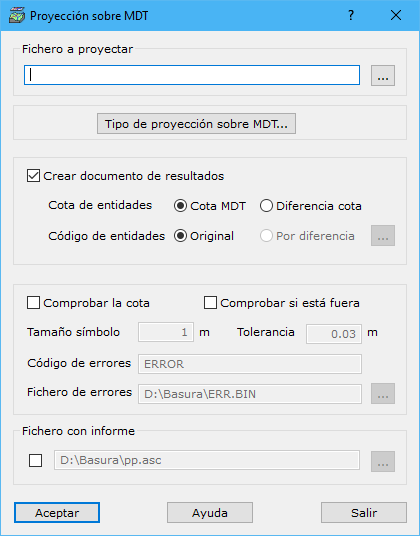
This dialog assigns elevations to file entities by projecting them onto the digital model, or compares their elevations with projected elevations, generating error marks when differences exceed a tolerance. Complete these fields:
- File for projection: file containing entities to project. Use the button to the right to find it in Windows Explorer. Formats: DIGI BIN, AutoCad DXF, MicroStation DGN, ESRI Shape or ASCII. Files can contain several entities, except ASCII, which reads only one as a line.
- Type of projection over DTM: dialog configuring profile projection onto the digital model.
- Create results document: generates a new document containing the projected vector file. Specify:
- Entity elevation: Z stored at each entity vertex. Two options:
- DTM elevation: elevation obtained directly from the point cloud.
- Elevation difference: difference between the stored file value and its point cloud projection, useful for finding entity elevation errors.
- Entity code: code or layer for storing vector entities. Two options:
- Original: retains the entity's original code.
- By difference: stores the entity with a code based on the elevation difference, the preceding parameter's second option. Set the code-to-elevation-difference relationship with the button to the right.
- Entity elevation: Z stored at each entity vertex. Two options:
- Check elevation: compares entity elevations with those obtained after projection onto the digital model.
- Check outside: marks entities outside the digital model's outer boundary.
- Symbol size: generated error mark size in meters.
- Tolerance: maximum permitted entity elevation difference, in meters.
- Error code: code for recording errors.
- Error file: file name with extension for storing errors. Use the button to the right to specify its location. Available formats:
- DIGI: BIN extension.
- AutoCad: DXF extension.
- MicroStation: DGN extension.
- Report file: generates a report listing projected entities and their original errors. Use the button to the right to locate the file in Windows Explorer.
Requires an active triangulated digital model document.