MACRO_INSTRUCTIONS
Run macroinstructions, also called at-sign macros.
Parameters
Does not accept parameters.
Run a macro-instruction file dialog box
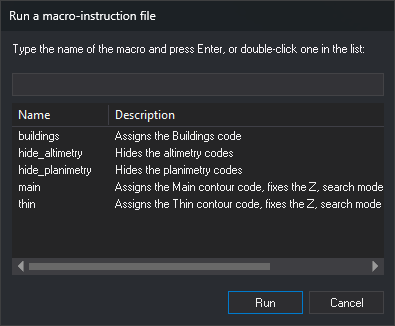
Choose the macroinstruction to run in this dialog box.
- Text box: enter the macroinstruction name without the at sign and press Enter or click Run. As you type, the list shows only macroinstructions whose name or description contains the text, ignoring case.
- List: double-click a macroinstruction to run it. Double-clicking an empty part of the list does nothing. Single-clicking a row does not change the text box: Run always executes the name entered in that box. The list has Name and Description columns and shows:
- macroinstructions from the code table, with their descriptions;
- macroinstruction files (
@nombre) from the macro directory. Name shows the file name without the initial at sign. If the first line is a comment (starting with//or#), its text appears as the description.
- Run: prefix the entered name with an at sign and execute it as if typed in the command line. If the box is empty or contains only spaces, sound a warning tone and leave the dialog box open.
- Cancel: close without running a macroinstruction.
Command characteristics
| Command type | Interactive command |
|---|---|
| Repeats automatically | No |
| Menu option | Immediate/Run a macro-instruction file (@)... |
| Toolbar | This command has no associated toolbar button |
| Extension | DigiNG.OrdenesStandard.dll |
| Implementation | Native |
| Related variables | No related variables |
| Related commands | No related commands |
| Internal name |