Display properties
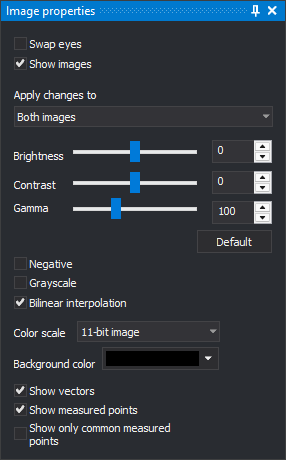
This pane changes how images and vectors are drawn in the active photogrammetric window.
Fields
- Swap eyes: shows the left image to the right eye and the right image to the left eye.
- Show images: when disabled, only vectors are drawn and radiometric controls are disabled.
- Images to which changes are to be applied: images affected by brightness, contrast, gamma, negative, grayscale, bilinear interpolation and color scaling: Both images, Left image or Right image.
- Brightness: −100 to 100. Default: 0.
- Contrast: −100 to 100. Default: 0.
- Gamma: 0 to 300, in hundredths (100 means gamma 1.0). Default: 100.
- Default: resets brightness to 0, contrast to 0 and gamma to 100, and enables bilinear interpolation.
- Negative: inverts image colors.
- Grayscale: draws grayscale images.
- Bilinear interpolation: smooths pixels when zooming in. When disabled, each pixel is drawn as a uniformly colored square.
- Color scale: significant bit count for images with 16 bits per band. Multiplies pixel values to fill the 16-bit range. For example, 11-bit image multiplies each value by 32. Do not scale color leaves values unchanged.
- Background color: color of photogrammetric window areas not covered by images.
- Show vectors: draws drawing file entities over images.
- Show measured points: draws points measured in orientations.
- Show only common measured points: draws only points measured in both model images. Enabled with Show measured points.
Digi3D.AI saves brightness, contrast, gamma, negative, color scale and bilinear interpolation in the user registry and applies them to the next photogrammetric window opened.
DEM
This section draws digital elevation model (DEM) points over images. It appears only if the user registry contains an alias for one of these DEM commands: save DEM, project DEM, project line onto DEM or move Z onto DEM. Controls are disabled unless the drawing window has a TIFF DEM loaded.
- Show DEM points: draws DEM points in the photogrammetric window.
- Distance between points: spacing of drawn points. The drop-down offers 1 to 40 times the DEM cell size. Loading a DEM selects 40 times the cell size.
- Scale distance based on zoom: multiplies point spacing by the reduction factor of the rendered image. Zooming out draws points farther apart.
- DEM color: point color.
- Points size: point size, from 1 to 10.
- Show triangles: draws the DEM with triangles.
Digi3D.AI saves color, point size, Scale distance based on zoom and Show triangles in the user registry.
Showing the pane
Select Photogrammetric window/Display properties....
Example
See Changing image radiometry in the photogrammetric window.