RENAME_UNKNOWN_CODES
Replace unknown codes on entities in the active drawing file with codes from the code table.
Parameters
Does not accept parameters.
Notes
A code is unknown when it is not defined in the code table, for example, because the drawing file was created with a different table. The command searches for unknown codes on undeleted entities in the active drawing file. It does not search other loaded drawing files.
To remove unknown codes without replacing them, use DELETE_UNKNOWN_CODES.
Dialog box
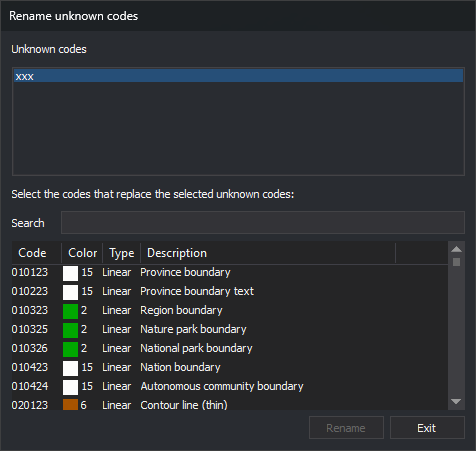
Running the command displays the Rename unknown codes dialog box:
| Field | Description |
|---|---|
| Unknown codes | Unknown codes in the active drawing file, sorted alphabetically without duplicates. Each click selects or deselects a code, allowing you to select several without holding any key |
| Search | Filter the table's code list. See Search |
| Code list | Codes from the code table, with their color, type (point, linear, or virtual), and description. Hold Ctrl or Shift while clicking to select several |
If the active drawing file has no unknown codes, the Unknown codes list is empty, and the Search field and code list are disabled.
Search
The Search field filters the code list as you type:
- Text displays codes starting with that text and codes whose descriptions contain it. Matching is case-sensitive for codes, and
?replaces any single character. Matching is case-insensitive for descriptions. - Text starting with
#displays codes assigned the tag that follows, case-insensitively. For example,#hidrografia. - An empty field displays all codes.
Changing the text clears the code list's selection.
Rename codes
The Rename button is enabled when at least one code is selected in Unknown codes and one in the code list. Clicking it processes each undeleted entity in the active drawing file with any selected unknown code:
- Remove the selected unknown codes from the entity.
- Retain its other codes in the same order, including unknown codes you did not select.
- Append the codes selected in the code list that the entity does not already have.
If you select several table codes, each entity receives all of them and has multiple codes. If you select several unknown codes, they are all replaced by the same codes.
The command does not modify the entity in the file: it deletes it and appends a copy with the new codes to the drawing file. The copy retains the original entity's geometry, color, thickness, and attributes.
After renaming, the dialog box remains open. The drawing window is refreshed, and the Unknown codes list is recalculated: renamed codes disappear from it, and no code remains selected. The code list retains its filter and selection.
Click Exit to close the dialog box and end the command. Exit does not undo completed renaming operations.
UNDO undoes all renaming performed while the dialog box was open at once.
Each entity is handled independently: if Digi3D.AI rejects an entity with the new code, the corresponding original entity is preserved unchanged; new codes are assigned to entities whose changes are accepted.
Command characteristics
| Command type | Immediate command |
|---|---|
| Repeats automatically | No |
| Menu option | Edit/Rename unknown codes... |
| Toolbar | This command has no associated toolbar button |
| Extension | DigiNG.OrdenesStandard.dll |
| Implementation | Native |
| Related variables | No related variables |
| Related commands | DELETE_UNKNOWN_CODES RENAMCOD UNDO |
| Internal name | {4B10E14D-3CF6-4CD3-975F-EE1544AA3C72} |