LOAD_TASKS_FILE_FORMAT
Read a text file containing point coordinates and create one task per line in the Tasks pane.
Parameters
Does not accept parameters.
Notes
The command displays the Task generator based on file dialog box:
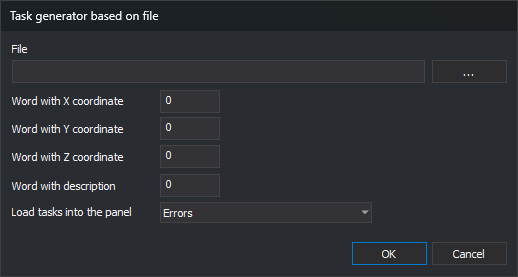
| Item | Description | Values |
|---|---|---|
| File | Text file path. The ... button opens a dialog box to choose it. | File path |
| Word with X coordinate | Position of the word containing the X coordinate | Integer greater than or equal to 0; the first word is 0 |
| Word with Y coordinate | Position of the word containing the Y coordinate | Integer greater than or equal to 0 |
| Word with Z coordinate | Position of the word containing the Z coordinate | Integer greater than or equal to 0 |
| Word with description | Position of the word displayed as the task description | Integer greater than or equal to 0 |
| Load tasks into the panel as | Type of tasks created | Messages, Warnings, or Errors. Default: Errors |
Position fields only accept digits. The dialog box saves all values when you click OK and displays them the next time you run the command.
File format
- Each line is split into words. Words are separated by spaces, tabs, commas, or
=. Consecutive separators count as one. - Text enclosed in double or single quotation marks is a single word, even if it contains spaces. Use this to write a description with multiple words:
100.5 200.25 35.0 "Poste roto". - The coordinate decimal separator is a period.
- The command skips a line in these cases:
- The line has fewer words than the highest position specified in the dialog box.
- The X, Y, or Z word does not start with a number; for example, a header line.
- The file can be encoded as UTF-8, with or without a BOM, or as ANSI. UTF-16 is not supported.
Created tasks
Each valid line creates a task in the Tasks pane:
- The Description column displays the word specified in Word with description.
- The File column displays the text file path.
- The Unit column displays
DigiNG.OrdenesStandard.
A red triangle is drawn in the drawing window at each task's coordinates. Double-click a task to move the drawing window to its coordinates.
If Empty automatically is enabled, the command removes tasks from the pane before adding new ones. If Group tasks by coordinates is enabled, tasks with the same X and Y coordinates are grouped.
Errors
- If the file cannot be opened, the command displays Error when opening file and does not modify the pane.
- If any position is negative, the command sounds an error tone and ends without reading the file.
Command characteristics
| Command type | Interactive command |
|---|---|
| Repeats automatically | No |
| Menu option | Window/Tasks/Load tasks file (ascii) |
| Toolbar | This command has no associated toolbar button |
| Extension | DigiNG.OrdenesStandard.dll |
| Implementation | Native |
| Related variables | No related variables |
| Related commands | DELETE_TASKS LOAD_TASKS SAVE_TASKS TAREA+ TAREA- |
| Internal name | {6E345000-A069-4a06-94BF-5E7D0ACBB0D1} |