Add topology
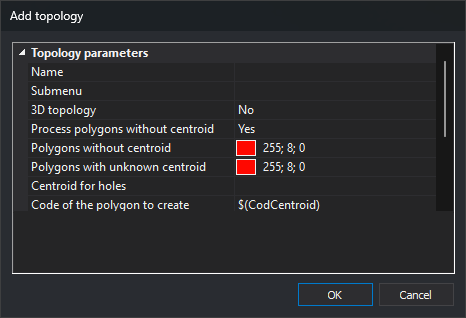
Configures a topology to add to the code table's topology list.
Name
Topology name, used for options in the dynamic Topology menus.
Process polygons without centroid
Whether topology analysis reports an error for each topological polygon without a centroid.
Polygons without centroid
Fill color for topological polygons without a centroid.
A strong color such as pure red makes these easy to identify.
Polygons with unknown centroid
Fill color for polygons whose centroid is absent from this topology's configured centroid set.
Centroid for holes
Text identifying centroids treated as holes.
Code of the polygon to create
Code used when generating polygons from this topology.
Accepts a macro, such as $(CodigoCentroide) or $(TextoCentroide).
Polygon Z coordinates
Source of Z for each generated polygon vertex:
- From the centroid: all vertices take the centroid's Z.
- 2.5D from polygon geometries: uses constituent geometry Z values. At a node where incoming lines have different Z values, uses one of them.
- 3D from polygon geometries: uses constituent geometry Z values. At a node with different incoming Z values, includes both to form a three-dimensional polygon.
- Project on a loaded DTM: takes Z from digital terrain model (DTM) files loaded when converting topology to polygons.
Tag of the DTM to project onto
If Polygon Z coordinates is Project on a loaded DTM, optionally enter a tag here.
Only DTM files with that tag will be used.
For example, several loaded GeoTIFFs may have tags MDT (terrain) or MDS (surface). Enter MDS to project topology polygons onto files tagged MDS.