Create photogrammetric project
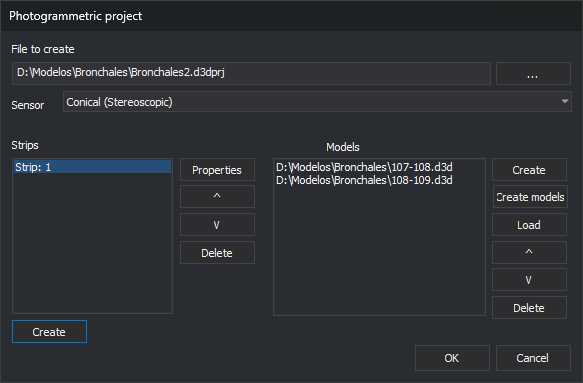
This dialog creates or edits a photogrammetric project file (.d3dprj). The file lists project strips and the models (.d3d files) in each strip. The Photogrammetric project pane loads it for fast model switching.
Opening the dialog
Click the new project button on the Photogrammetric project pane toolbar.
The dialog requires the photogrammetry license module. If the computer's license does not include the photogrammetry module, Digi3D.AI displays a message and does not open the dialog.
Fields
File project: project file path. ... selects it. While empty, Sensor, strip and model buttons, and OK are disabled.
If the file exists, its strips and models are loaded for editing. If it is not valid XML, the dialog shows “Error on line: n, column: n” with the cause, and controls remain disabled.
Sensor: sensor for models created with Create and Create Various. Only sensors that can create projects are listed: Conical (Stereoscopic) and RPC Satellite (stereoscopic) (RPC: rational polynomial coefficients). See Projects with multiple pairs for RPC Satellite projects. Initially the sensor selected the last time OK was clicked is selected automatically.
Strips: project strips.
- Create: opens Strip properties and adds a strip.
- Properties: changes the selected strip's name. Also opened by double-clicking the strip.
- ^ and V: move the selected strip up or down.
- Delete: deletes the selected strip.
Models: models in the selected strip. These buttons, the strip buttons and OK are only enabled if a strip is selected.
- Create: creates a model with Create model.
- Create Various: creates several models from photo numbers with Create multiple models. Only enabled if supported by the sensor. Models already in the list are not added again.
- Load: adds an existing model file (
.d3d). - ^ and V: move the selected model up or down.
- Delete: removes the selected model from the strip without deleting its file.
OK: saves the project file. If there are no strips, displays “There is no data to be saved. Create a strip and add models.” and does not save.
Cancel: closes without saving.
Strip properties
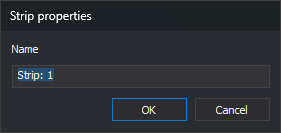
- Name: strip name. A new strip defaults to Strip: followed by its number.
Notes
If Replace paths with placeholders is enabled, model paths use $(DirectorioTrabajo) when models are in the project file folder.