Tests
Tools/Tests finds code table problems. All checks also run on opening a code table.
| Option | Checks |
|---|---|
| All | Runs the following checks in order. |
| Styles/Invisible symbols | Symbol styles with zero X or Y scale. Offers correction: zero scale factors and distance become 1. |
| Styles/Nonexistent symbols | Point codes with no symbol style in their representations, making them invisible. Lists only. |
| Styles/Same styles | Identical representations. See Delete superfluous styles?. |
| Styles/Styles not used | Styles unused by codes. Offers deletion. |
| Codes/Codes with nonexistent styles | Representations referencing absent styles. Offers replacement through Select style. |
| Database/Nonexistent tables | Codes' Table references absent from Database. Lists only. |
| Database/Tables with no primary key | Tables without primary keys. Lists only. |
| Database/Tables with multiple primary keys | Tables with multiple primary key fields. Lists only. |
| Database/Tables whose primary key is not of the type "numeric" | Non-numeric primary keys. Lists only. |
Each check displays a message only if it finds a problem.
Before Invisible symbols, Same styles or Styles not used, the editor asks whether to apply or discard pending Styles and Codes changes. Deleting styles reloads both tabs.
Delete superfluous styles?
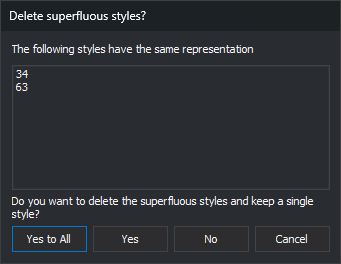
Same styles opens this dialog per identical representation group. The following styles have the same representation lists it: the first is retained, subsequent styles are redundant.
- Yes to All: deletes redundant styles in this and following groups without further prompts.
- Yes: deletes redundant styles in this group.
- No: keeps this group and proceeds.
- Cancel: stops checking. Already deleted styles are not restored.
Code representations using a removed style are reassigned to the retained style.