Topologies
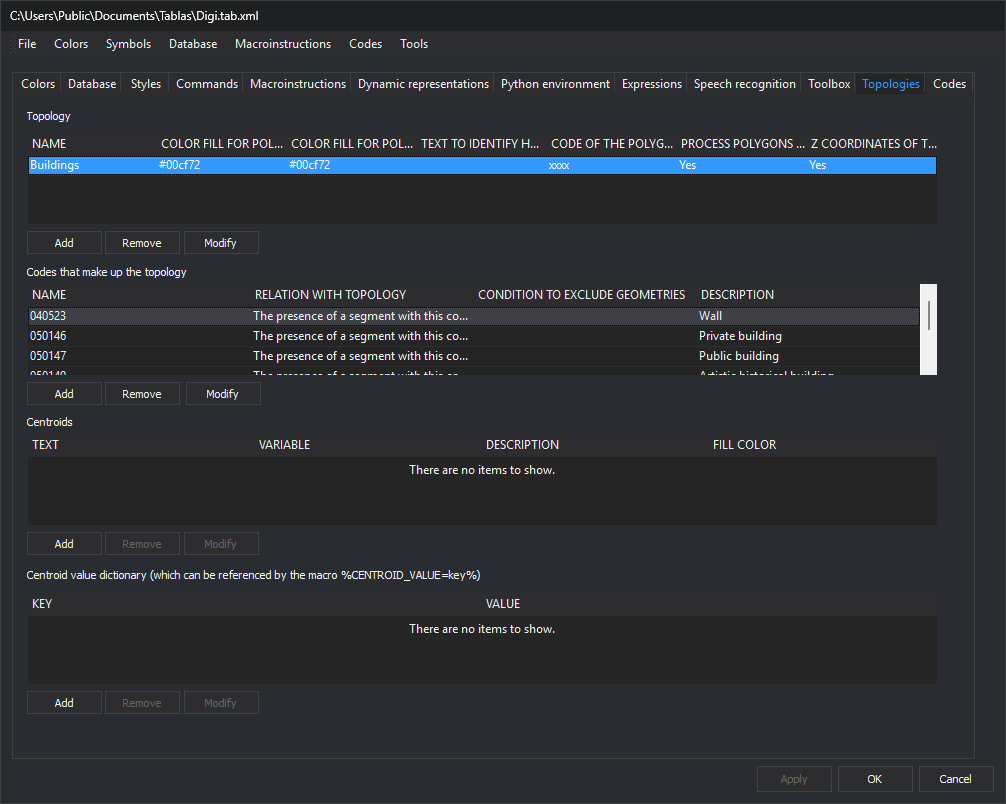
Configures topologies generated through Digi3D.AI's Topology menu.
Description
A topology is a named selection of line codes.
Analyzing a topology geometrically examines all drawing file lines having one of those codes.
Line continuity is analyzed to find all possible topological polygons.
Each polygon is checked for a Centroid. Multiple centroids are an error. Topology configuration determines whether a missing centroid is an error.
Areas
The tab has these areas:
Configured topology list
All topologies configured in the code table.
Buttons:
- Add: opens Add topology.
- Remove: deletes the selected topology.
- Modify: edits it with Add topology.
Code list
Codes forming the selected topology in the configured topology list.
Buttons:
- Add: adds a code through Select codes for topology.
- Remove: deletes the selected code.
- Modify: edits it through Select codes for topology.
Centroid list
Centroids configured for the selected topology in the configured topology list.
Buttons:
- Add: opens Add centroid.
- Remove: deletes the selected centroid.
- Modify: edits it through Add centroid.
Value dictionary
The value dictionary associated with the selected centroid list entry.
Buttons:
- Add: opens a dialog to enter a key and value.
- Remove: deletes the selected entry.
- Modify: edits it.