TOL
Set the tolerance factor for generalization.
Parameters
| Parameter number | Description | Values | Optional |
|---|---|---|---|
| 1 | Numeric value. If omitted, the status bar displays a text box for entering the value; you can also digitize two points to assign the distance between them. | Real number or ? | Yes |
Examples
TOL=10
Set the tolerance factor to 10 m.
TOL=?
Display the current tolerance factor.
Notes
Enter the tolerance factor in the drawing file's coordinate units (meters in a projected coordinate reference system). Its initial value is the generalization tolerance from the drawing file settings, and it is reassigned each time a drawing file is opened.
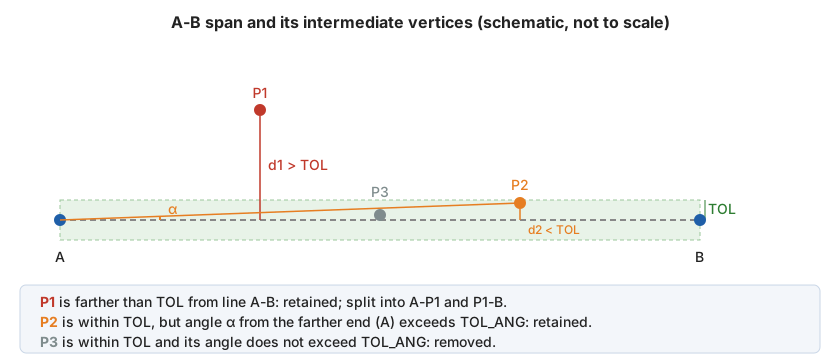
GEN and GEN_2D use the Douglas-Peucker algorithm. For each span of the entity, they calculate the distance of each intermediate vertex from the straight line through the span's ends, rather than from the segment joining the preceding and following vertices:
- If any vertex is farther than TOL, retain the farthest vertex and split the span in two at that vertex.
- If no vertex is farther than TOL from the straight line through the span's ends, vertex retention depends on the angular tolerance TOL_ANG.
GEN measures distance in 3D space, including Z; GEN_2D measures only in the XY plane.
Command characteristics
| Command type | Real variable |
|---|---|
| Repeats automatically | No |
| Menu option | This command has no associated menu option |
| Toolbar | This command has no associated toolbar button |
| Extension | DigiNG.OrdenesStandard.dll |
| Implementation | Native |
| Related variables | TOL_ANG |
| Internal name | {57647E08-06CB-448b-BD9A-639C5008A176} |