Quality control error
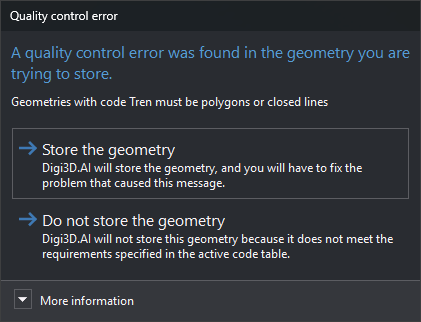
Digi3D.AI displays this dialog after digitizing a geometry when one of its code's quality controls detects an error in the geometry or its relationship with other geometries. Analysis runs if QUALITY_CONTROL_ON_ENTITY_END is enabled and the code's Analyze quality control when digitizing property is Yes in the code table.
If quality controls return several errors, the dialog appears once and shows them all, one per line. Warnings do not open this dialog: Digi3D.AI displays them in a balloon and stores the geometry.
Contents
- Text: error message returned by the quality control, or all error messages, one per line. In the screenshot: “Geometries with code Tren must be polygons or closed lines”.
- More information: explains that quality control analysis is enabled and can be disabled with QUALITY_CONTROL_ON_ENTITY_END or Quality control/Analyze quality control when an entity is finished.
Buttons
The dialog has no close button: you must choose one of these buttons.
- Store the geometry: stores the geometry with the error. If the quality control supplies error coordinates (with several errors, those of the first error supplying coordinates), the drawing window moves there and, if GOTO_SNAP is enabled, the cursor moves to that point.
- Do not store the geometry: discards the geometry, removes it from the screen, plays the error sound and displays the quality control message in a balloon.