Insert curved element
After entering a new alignment's straight sections, insert curved elements tangent to its segments.
Select Insert curve on the Horizontal tab. Left-click an alignment point near the vertex that will contain the curve.
Once the location is accepted, a dialog displays the vertex and its preceding and following point coordinates, plus tangent azimuths and lengths represented by the segments joining those points to the vertex.
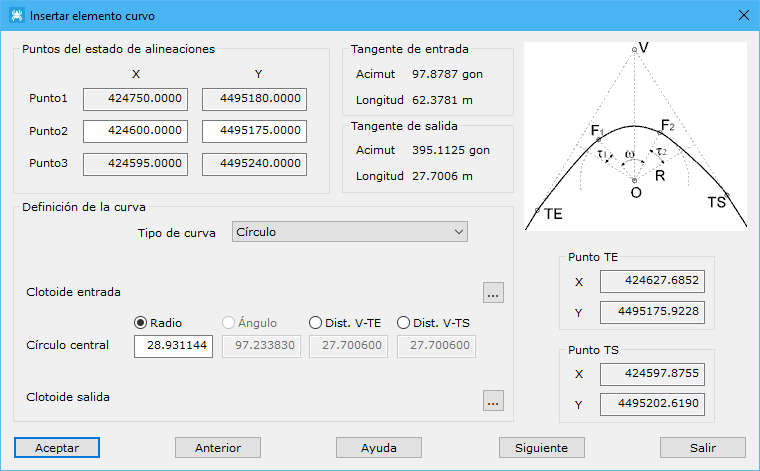
Set curve parameters at the bottom. The program automatically calculates tangent point coordinates on the right and other parameters as you enter values. A valid curve requires distances from the vertex to tangent points shorter than the tangent lengths shown above. If invalid, tangent coordinates are not displayed and OK remains disabled.
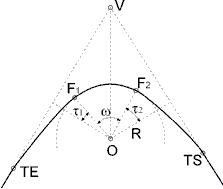
Curve definition parameters:
- Curve type: choose:
- Circle: a circular element only; displays central circle parameters.
- Clothoid-Circle: entry clothoid followed by a circle; displays entry clothoid and central circle parameters.
- Circle-Clothoid: circle followed by an exit clothoid; displays central circle and exit clothoid parameters.
- Asymmetric Clothoid-Circle-Clothoid: entry clothoid, circle and exit clothoid, with potentially different clothoids. Displays all three parameter groups.
- Symmetric Clothoid-Circle-Clothoid: entry clothoid, circle and identical exit clothoid. Displays all three groups, but exit parameters cannot be selected because they equal the entry parameters.
- Spiral input: four defining parameters:
- Length: clothoid length from entry tangent to F, where the circle begins, in meters.
- Angle tao: angle between the perpendicular from circle center to entry tangent and the radius to F, in grads.
- A param.: dimensionless transition curve constant.
- Dist. V-TE: vertex-to-entry-tangent distance, in meters.
- Central circle: four defining parameters:
- Radius: distance in meters from circle center to tangent points for a circle-only element, or to F where the circle begins after or before a clothoid.
- Angle: angle in grads between radii to the circular element's start and end points. Cannot be changed for a circle-only element.
- Dist. V-TE: vertex-to-entry-tangent distance in meters. Displayed only for a circle-only element.
- Dist. V-TS: vertex-to-exit-tangent distance in meters. Displayed only for a circle-only element.
- Spiral output: uses the same parameters described for the entry clothoid.
Two additional buttons open the curve calculator, displaying more parameters to help define the curve.
Accepting modifies the alignment and adds calculated tangent points. Edit these points and the curve radius graphically with Edit alignment on the Horizontal tab. Moving tangent points changes the radius; moving the vertex changes tangent point positions.
To edit a curve numerically, use Edit curve on the Horizontal tab, which opens this same dialog.