Lighting properties
This dialog edits the lighting received by a digital model. You can change light values and the light source coordinates. It is only available with an active digital model.
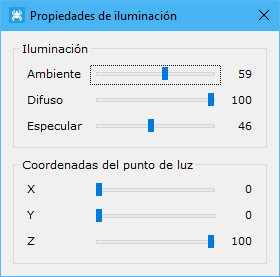
The displayed parameters range from zero to one hundred:
- Lighting:
- Ambient: ambient light intensity. This is the ambient color, corresponding to the unlit part of a material. It is often the same as the diffuse color.
- Diffuse: diffuse light intensity. The diffuse color is the color emitted by an illuminated material.
- Speculate: specular light intensity.
- Coordinates of the light: moves the light source by setting its X, Y and Z coordinates.
The dialog remains open until you explicitly close it, allowing you to continue manipulating the document.
See also: