Update a code table's Python quality controls
Python quality controls in codes tables from earlier Digi3D versions are incompatible with Digi3D.AI. Opening a drawing with such a table, or analyzing quality controls, produces an error such as:
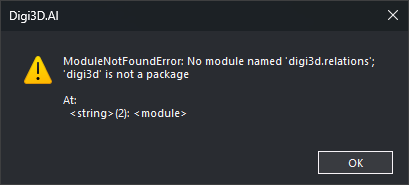
ModuleNotFoundError: No module named 'digi3d.relations'; 'digi3d' is not a package
Replace the table's Python environment with the latest Digi21 quality controls.
Steps
- Back up the codes table file. New controls do not work in earlier Digi3D versions: use the backup if you continue using those versions.
- Open the table with Code table editor.
- Select Python environment.
- Click Download the latest version from GitHub below the editor, replacing tab contents.
- Click Apply.
- Click OK.
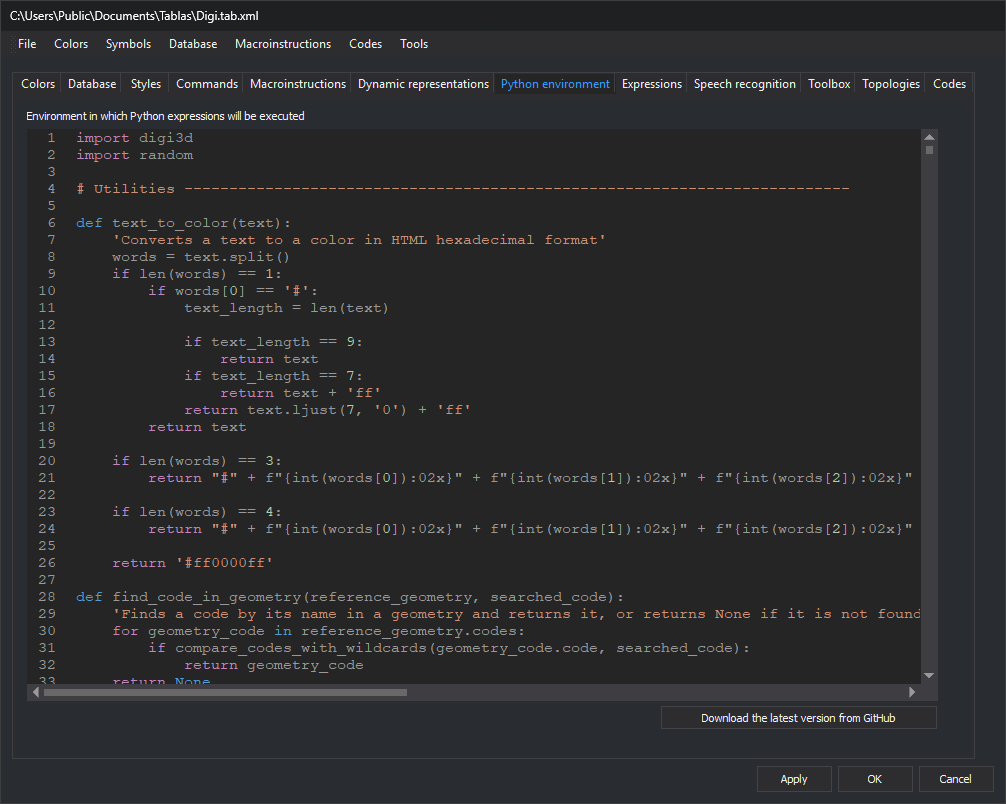
Reopening the drawing in Digi3D.AI restores working quality controls.
Downloading in step 4 deletes custom functions. Copy them beforehand and append them afterwards. Functions using old modules or names (such as
digi3d.relationsorg.codes[0].name) require adaptation to the Digi3D.AI Python API. Changed Python API names lists replacements or missing equivalents.
Errors after replacing the environment
Opening a drawing executes the codes table's Python environment in interpreter module __main__. Running ON_PYTHON_EXPRESSION, OFF_PYTHON_EXPRESSION, ON_ONLY_PYTHON_EXPRESSION and SELECT_PYTHON_EXPRESSION from the command line, menus or macro instructions evaluates their expressions, including table selections, in __main__. Expressions can therefore use g, built-ins such as len or type, and environment names. Old expressions and custom functions produce these errors if they use names absent from the downloaded environment or changed in Digi3D.AI.
Expression errors display a Python error message. In the failing file, ON_PYTHON_EXPRESSION and OFF_PYTHON_EXPRESSION leave visibility unchanged for that expression (with multiple # selections, apply those that succeed). ON_ONLY_PYTHON_EXPRESSION hides everything except geometries passing another successful # selection; SELECT_PYTHON_EXPRESSION sends an empty selection to the active command. Inside a macro instruction (@), the next command runs after the message closes. For example, an OFF_PYTHON_EXPRESSION error while hiding texts does not stop subsequent topology creation; the topology runs without OFF_PYTHON_EXPRESSION having hidden texts in failing files. See ON_PYTHON_EXPRESSION.
NameError when using Text, Line, Point, Polygon or Complex
Expressions or called environment functions using a geometry type without digi3d. fail if the environment does not import that name. The message begins:
NameError: name 'Text' is not defined
The quoted name is undefined: Text, Line, Point, Polygon, Complex or another digi3d name. Older environments could use from digi3d import *, defining all public digi3d names. The GitHub environment starts with import digi3d and import random, without from digi3d import *, so module names require digi3d.. This OFF_PYTHON_EXPRESSION expression fails:
OFF_PYTHON_EXPRESSION=type(g) is Text and "_A_" in g.codes[0].name
Fix it in either way:
Below the first
import digi3d, import names required by expressions and functions:import digi3d from digi3d import Point, Text, Line, Polygon, ComplexAdd other reported names from
digi3dto the list.Prefix unqualified
digi3dnames withdigi3d.:type(g) is digi3d.Text.
After editing, click Apply and OK in Code table editor, then reopen the drawing to execute the changed environment.
from digi3d import *also resolves the error, but definesWarningasdigi3d.TaskType.Warning. Expressions and functions usingWarningthen receivedigi3d.TaskType.Warninginstead of Python'sWarningexception. The downloaded environment does not use that exception. Importdigi3dnames individually if your functions use PythonWarning.
AttributeError when reading a code's name
After resolving NameError, the example raises AttributeError at g.codes[0].name for the first text having a code. The error contains:
object has no attribute 'name'
In Digi3D.NET 2023–2025, g.codes contained digi3d.Code, storing code text in name. In Digi3D.AI, g.codes contains FeatureCode, storing it in code. FeatureCode has no name.
Replace .name with .code for geometry codes. With from digi3d import Point, Text, Line, Polygon, Complex in the environment:
OFF_PYTHON_EXPRESSION=type(g) is Text and "_A_" in g.codes[0].code
Replace .name only on codes: Command.name and Camera.name still exist.
Changed Python API names
Lists digi3d names from Digi3D.NET 2023–2025 absent from Digi3D.AI and their replacements, where available. Other class, property, method, function and enumeration names remain. This compares names, excluding constructor argument changes.
| Digi3D.NET 2023–2025 | Digi3D.AI |
|---|---|
digi3d.Code |
digi3d.FeatureCode |
Code.name, such as g.codes[0].name |
FeatureCode.code, such as g.codes[0].code |
Geometry.drawing_file |
Geometry.file |
DrawingFile.min and DrawingFile.max |
Unavailable. |
digi3d.CoordinatesIterator and digi3d.GeometriesIterator |
Unavailable. Use for on a geometry or drawing file to iterate vertices or geometries. |
digi3d.relations submodule |
Geometry methods. See Geometry relationships. |
digi3d.CardinalPoint |
digi3d.StandardViewpoint. Up and Down become Top and Bottom; others keep their names. |
Camera.rotate_cardinal_point(cardinal_point) |
Camera.rotate_standard(viewpoint) |
Camera.rotation |
Camera.rotations |
Camera.frustrum_dimensions |
Camera.frustum_dimensions |
Camera.set_ortographic(min, max) |
Camera.set_orthographic(min, max) |
Camera.znear and Camera.zfar, and Camera.set_conic arguments znear and zfar |
Camera.z_near and Camera.z_far, and Camera.set_conic arguments z_near and z_far |
DrawingView.blendind |
DrawingView.blending |
DrawingView.paralelize_line_when_finish_line |
DrawingView.parallelize_line_when_finish_line |
digi3d.Inside, digi3d.Outside and digi3d.Edge |
digi3d.PointLineRelativePosition.Inside, digi3d.PointLineRelativePosition.Outside and digi3d.PointLineRelativePosition.Edge |
digi3d.N, digi3d.S, digi3d.E, digi3d.W and digi3d.C |
digi3d.TextJustification.N, digi3d.TextJustification.S, digi3d.TextJustification.E, digi3d.TextJustification.W and digi3d.TextJustification.C |
digi3d.NE, digi3d.NW, digi3d.SE and digi3d.SW |
digi3d.StandardViewpoint.NE, digi3d.StandardViewpoint.NW, digi3d.StandardViewpoint.SE and digi3d.StandardViewpoint.SW. For text justification, use digi3d.TextJustification.NE, digi3d.TextJustification.NW, digi3d.TextJustification.SE and digi3d.TextJustification.SW. |
digi3d.Up, digi3d.Down, digi3d.Left, digi3d.Right, digi3d.Front, digi3d.Back and digi3d.Free |
digi3d.StandardViewpoint.Top, digi3d.StandardViewpoint.Bottom, digi3d.StandardViewpoint.Left, digi3d.StandardViewpoint.Right, digi3d.StandardViewpoint.Front, digi3d.StandardViewpoint.Back and digi3d.StandardViewpoint.Free |
Digi3D.NET 2023–2025 exported PointLineRelativePosition, TextJustification and CardinalPoint values at digi3d module level. from digi3d import * imported them without prefixes (such as Inside). Since CardinalPoint followed TextJustification, digi3d.NE, digi3d.NW, digi3d.SE and digi3d.SW were CardinalPoint values. Digi3D.AI exposes PointLineRelativePosition, TextJustification and StandardViewpoint values only inside their enumerations, requiring prefixes such as digi3d.PointLineRelativePosition.Inside.
Geometry relationships
digi3d.relations grouped relationships in classes by both geometry types, exposing functions taking both geometries. Digi3D.AI equivalents are methods on the first geometry taking the second: digi3d.relations.LineLine.join(a, b) becomes a.touches(b). Geometry documents each.
Digi3D.NET 2023–2025 (digi3d.relations) |
Digi3D.AI |
|---|---|
PointPoint.disjoint(a, b), PointLine.disjoint(a, b), PointArea.disjoint(a, b), LineLine.disjoint(a, b), LineArea.disjoint(a, b) and AreaArea.disjoint(a, b) |
a.disjoint(b) |
PointPoint.coincident(a, b), PointLine.coincident(a, b) and PointArea.coincident(a, b) |
a.coincident(b) |
PointLine.coincident_and_terminate(a, b) |
a.coincident_and_terminates(b) |
PointArea.within(a, b), PointArea.withincoincident(a, b), LineArea.within(a, b) and AreaArea.within(a, b) |
a.within(b) |
AreaArea.completely_within(a, b) |
a.completely_within(b) |
LineArea.adjacent(a, b) and AreaArea.adjacent(a, b) |
a.adjacent(b) |
AreaArea.outer_ring_adjacent(a, b) |
No equivalent method. |
LineLine.join(a, b), LineArea.join(a, b) and AreaArea.join(a, b) |
a.touches(b) |
LineLine.endpoint_join_endpoint(a, b) and LineArea.endpoint_join(a, b) |
a.endpoint_touches(b) |
LineLine.endpoint_join_excluding_endpoints(a, b) |
a.endpoint_touches_interior(b) |
LineArea.terminates_within(a, b) |
a.terminates_within(b) |
LineLine.across(a, b) and LineArea.across(a, b) |
a.crosses(b) |
LineLine.get_cross_vertices(a, b, parar) |
a.cross_vertices(b, parar). Accepts only two Line geometries. |
LineLine.overlap(a, b) |
a.overlaps(b) |
AreaArea.overlap(a, b), returning a tuple whose first element indicated overlap |
a.overlaps(b), returning True or False. Replace AreaArea.overlap(a, b)[0] with a.overlaps(b). |
LineLine.equal(a, b) and AreaArea.equal(a, b) |
a.equals(b) |
PointArea, LineArea and AreaArea treated closed Line geometries as areas. Digi3D.AI chooses based on both types:
Treats a
Lineargument as an area inwithin,adjacent,terminates_within,completely_withinand any method called onPolygon.Treats the
Linereceiving the method as a line, andLinearguments as lines in methods other thanwithin,adjacent,terminates_withinandcompletely_withinwhen not called onPolygon.Raises
TypeErrorfor undefined type combinations. For example,linea.overlaps(poligono)produces:TypeError: La relacion 'overlaps' no esta definida para esa combinacion de tipos de geometria.
To treat a closed line as an area where these rules treat it as a line, create a polygon from its vertices first, then call the method on it or pass it as the argument:
poligono = digi3d.Polygon((), list(linea))