Plan configuration
This dialog changes options affecting the plan document generated when projecting a road document onto a digital model.
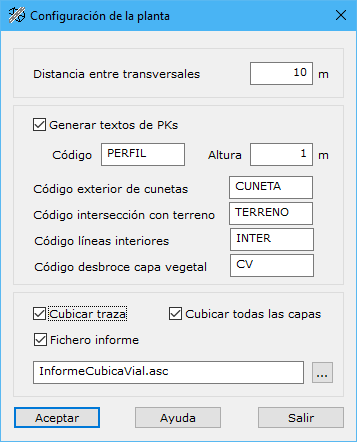
Options:
- Distance between cross sections: spacing in meters between cross sections used to define the road.
- Generate chainage texts: labels each generated cross section with its chainage. Specify text code and height when enabled.
- Calculate volume: calculates volume for the road alignment generated.
- Calculate all layer volumes: when volume calculation is enabled, calculates the different layers formed by road templates.
- Report file: when volume calculation is enabled, generates an ASCII report of calculations. Enter its name in the following field or select its location with the button to the right.