CIRCR
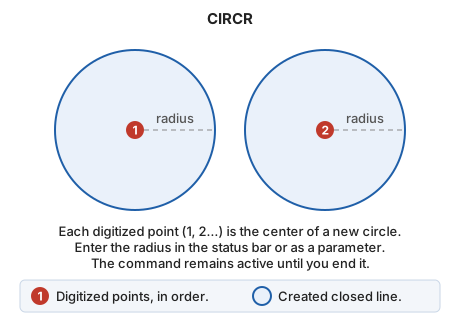
Draw a circle by defining its center and entering its radius numerically.
Parameters
| Parameter number | Description | Values | Optional |
|---|---|---|---|
| 1 | Circle radius, in coordinate reference system units | Number | Yes |
Notes
The command displays a status bar field containing the radius, which you can change at any time. Each point you digitize is the center of a new circle with that radius; the command remains active until you end it.
Command characteristics
| Command type | Interactive command |
|---|---|
| Repeats automatically | Yes |
| Menu option | Draw/More/Circumference with center and radius |
| Toolbar | Circumferences |
| Extension | DigiNG.OrdenesStandard.dll |
| Implementation | Native |
| Related variables | No related variables |
| Related commands | CIR2P CIR3D CIR3P |
| Internal name | {958A46FD-8051-4660-82A2-F5A14F314854} |