Generate video
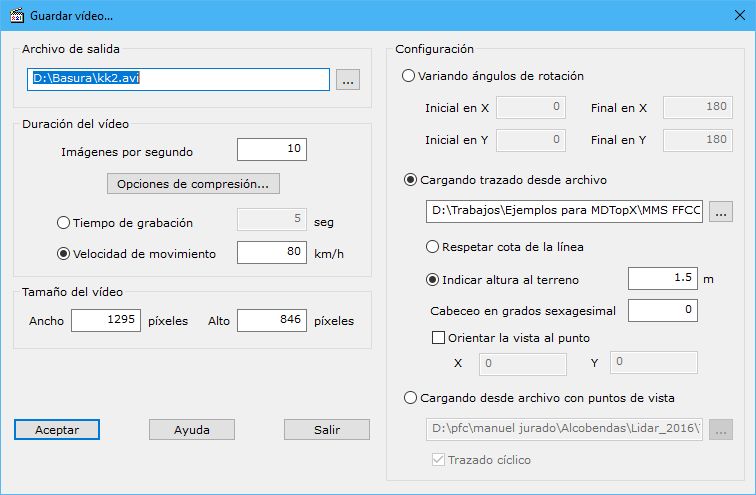
This tool generates an AVI video moving around a digital model or file. Its dialog contains the following fields:
- Output file: name of the file storing the video. The button to the right opens Windows Explorer to choose its location.
- Video length: defined by frames per second and total video duration:
- Fps: usually between 5 and 10. More frames per second produce a larger file with smoother movement.
- Recording time: maximum recording time in seconds, used to calculate camera movement speed.
- Movement speed: camera speed, used to calculate the maximum video recording duration.
- Video size: video window width and height in pixels.
- Settings: selects the type of video to generate. Two options are offered:
- Varying angles of rotation: rotates the model through the specified X and Y angle ranges.
- Loading from file road: loads the camera path from a drawing file (BIN, DXF, DGN or ASCII). The path can use its own elevations to calculate camera height, or be projected onto the model with an added height above terrain. You can also add camera pitch to point downward. Finally, the view can remain directed at the same model point while moving along the path, keeping a particular location in view.
- Loading from point of view file: generates a video from a file storing different viewpoints. Create this file with Save points of view. The path can also be cyclic, returning to the file's first point after reaching the end.