Grid line configuration
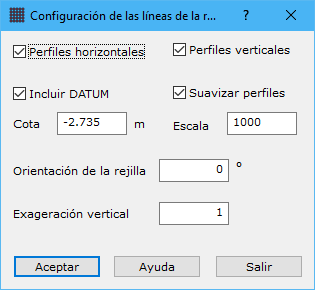
This dialog configures the grid projected onto the digital model. It can consist of horizontal and/or vertical profiles. Complete these fields:
- Horizontal profiles: enables or disables horizontal grid lines.
- Vertical profiles: enables or disables vertical grid lines.
- Include DATUM: generates a line around the grid at the specified Elevation. Useful in an isometric perspective to give the appearance of a portion cut from the terrain.
- Smooth profiles: enables or disables cubic spline smoothing of resulting grid lines.
- Elevation: Datum elevation in meters, if enabled.
- Scale: resulting grid scale denominator, needed for line smoothing and generalization.
- Grid orientation: horizontal grid line orientation in degrees. Vertical lines are perpendicular to it. At 0, vertical lines point north.
- Vertical exaggeration: elevation exaggeration of generated lines, useful for emphasizing relief.