Import NGIX catalog
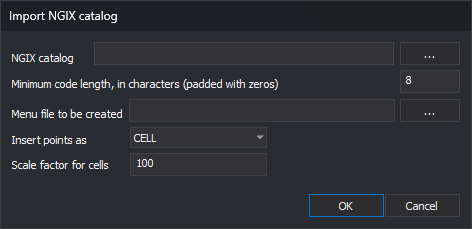
Opened by Codes/Import NGIX catalog.... Creates codes from a .cat NGIX catalog's features section and writes a Toolbox menu with them.
Controls
- NGIX Catalog:
.catfile. ... opens Open. - Minimum number of characters for codes (0's will be added at left of code name): minimum code width. Default: 8, so
1203becomes00001203. - Menu file to be created: output
.menu.xml. ... opens Save as. - Insert points as: DGN element type for codes with cells: CELL or SHARED_CELL.
- Scale factor for cells: DGN cell translation scale. Default: 100.
- OK: imports.
- Cancel: closes without importing.
Result
For each catalog code, the editor:
- Creates the code with catalog description, color and type; a cell also creates a symbol style named
Estilo_<célula>. - Fills DGN translation parameters with catalog level, color, line style, weight and cell.
- Adds a menu group per catalog section, with a code option running
cod=<código>.
Messages:
- The features section was not found: no
featuressection. - Error creating the menu file: cannot write
.menu.xml. - Unexpected end of file: catalog ends before closing sections.
- File imported successfully: import complete.