Perspective parameters
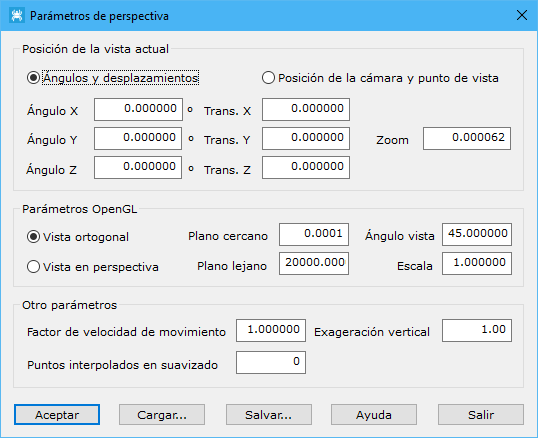
This dialog selects a different view of a file. Specify the following parameters:
- Current view position: enters the current view position numerically. You can also change it graphically with the Zoom tools on the Home tab. There are two ways to specify it:
- Angles and movement: defines the view through the object's position relative to the Cartesian axes:
- Angle X: view rotation about the X axis.
- Angle Y: view rotation about the Y axis.
- Angle Z: view rotation about the Z axis.
- Trans. X: view displacement along the X axis.
- Trans. Y: view displacement along the Y axis.
- Trans. Z: view displacement along the Z axis.
- Zoom: zoom level.
- Camera position and point of view: defines the view as a camera pointing at a particular point:
- Camera X: camera X coordinate.
- Camera Y: camera Y coordinate.
- Camera Z: camera Z coordinate.
- View X: X coordinate of the point the camera faces.
- View Y: Y coordinate of the point the camera faces.
- View Z: Z coordinate of the point the camera faces.
- Vertical X: X component of the vector defining the camera's vertical direction.
- Vertical Y: Y component of the vector defining the camera's vertical direction.
- Vertical Z: Z component of the vector defining the camera's vertical direction.
- Angles and movement: defines the view through the object's position relative to the Cartesian axes:
- OpenGL parameters:
- View type: selects Orthogonal or Perspective. You can also use Orthogonal view and Perspective view on the Home tab.
- Near plane: distance from the viewer to the first visible plane.
- Far plane: distance from the viewer to the last visible plane.
- Angle view: viewing angle perpendicular to the screen, in degrees.
- Scale: scale factor for exaggerating size.
- Other parameters:
- Factor movement speed: factor for changing movement on screen.
- Vertical exaggeration: vertical scale for exaggerating relief.
- Smoothing interpolated points: number of points to display when a grid digital model is smoothed.
Load or save all these parameters in ASCII files with the Load... and Save... buttons, respectively.