SEE_TOPOLOGIES
Show or hide loaded topologies and change their drawing order.
Parameters
| Parameter number | Description | Optional |
|---|---|---|
| 1 | Topology name | Yes |
| 2 | Visible: 0 hides it; any other number shows it |
Yes |
Notes
Both parameters must be supplied together. If you supply only the name, the command sounds the error tone and does nothing. Enclose names containing spaces in quotes. If no loaded topology has that name, ignoring case, the command changes nothing.
With parameters, the command does not display a dialog box: it shows or hides the specified topology and refreshes the view. The Topology/View menu options run the command this way: All topologies, No topology, and one option per loaded topology, selected if that topology is visible.
Example
SEE_TOPOLOGIES="Topología creada a las 11:15:27" 0
Dialog box
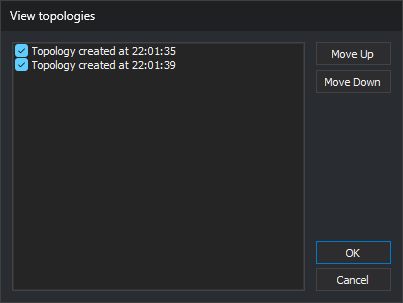
Without parameters, the View topologies dialog box asks which topologies to display and in what order. If no topology is loaded, the command sounds the error tone, displays No topological file can be modified as none is loaded, and ends.
The list contains loaded topologies in their current drawing order. Each topology has a checkbox selected if it is visible.
| Control | Description |
|---|---|
| Topology list | Select the topologies to display. Topologies are drawn in list order, from top to bottom: each is drawn after those above it |
| Move Up | Move the selected topology up one position. Sound the error tone if none is selected or it is already first |
| Move Down | Move the selected topology down one position. Sound the error tone if none is selected or it is already last |
Click OK to apply list order and visibility, refresh the view, and sound a tone. Click Cancel to end without changing order or visibility.
Command characteristics
| Command type | Immediate command |
|---|---|
| Repeats automatically | No |
| Menu option | Topology/View/All topologies Topology/View/No topology Topology/View/(one option per loaded topology) |
| Toolbar | This command has no associated toolbar button |
| Extension | DigiNG.OrdenesTopologia.dll |
| Implementation | Native |
| Related variables | No related variables |
| Related commands | BINTOP |
| Internal name |