SCRATCH
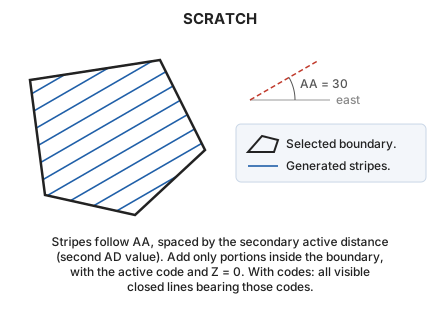
Hatch the interior of a closed area entity with parallel lines.
Parameters
| Parameter number | Description | Optional |
|---|---|---|
| 1 | Code or codes (one or more, separated by spaces) | Yes |
Without parameters, select the closed line to hatch. With codes, hatch all visible closed lines bearing them and end.
Notes
Stripes follow the active angle and are spaced by the secondary active distance, set with AD's second parameter. With one AD value, the secondary distance equals the primary.
Add only stripe portions inside the boundary, with the active code and Z = 0.
Command characteristics
| Command type | Interactive command |
|---|---|
| Repeats automatically | Yes |
| Menu option | Draw/More/Fill polygon with parallel stripes |
| Toolbar | This command has no associated toolbar button |
| Extension | DigiNG.OrdenesStandard.dll |
| Implementation | Native |
| Related variables | AA — active angle AD — active distance REPEAT — repeat the last command executed |
| Related commands | POINT_WEAVE SIMB WEAVE |
| Internal name | {91CEE0AF-E015-4d1e-A414-9250FAD17CCC} |