Start Scan
This tool communicates with the scanner to start a scan.
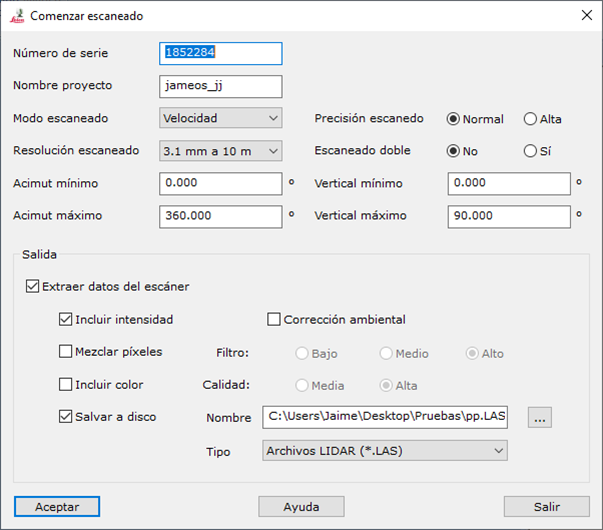
The following parameters are required:
- Scanner serial number: scanner serial number. Consult the device documentation to locate it.
- Project name: scanner project used to store the scan. Created if it does not exist.
- Scanning Mode: Speed, Distance, Medium distance or Long distance.
- Scanning Precision: Normal or High.
- Scanning Resolution: available resolutions at a distance of 10 m:
- 50 mm
- 25 mm
- 12.5 mm
- 6.3 mm
- 3.1 mm
- 1.6 mm
- 0.8 mm
- Double Scanning:
- Minimum azimuth: minimum horizontal angle relative to the scanner's horizontal circle zero, in degrees. Minimum 0.
- Maximum azimuth: maximum horizontal angle relative to that zero, in degrees. Maximum 360.
- Minimum elevation: minimum vertical angle from horizontal, in degrees. Minimum -90.
- Maximum elevation: maximum vertical angle from horizontal, in degrees. Maximum 90.
- Output:
- Extract data from scanner: transfers recorded data to the computer. If disabled, the scan remains in scanner memory.
- Include intensity: includes each point's recorded intensity.
- Environmental Correction:
- Mixed Pixels:
- Include colour:
- Save file to disk: saves the file to disk.
- Name: file name.
- Type: file type.