ABSOLUTE_ORI
Performs the absolute orientation of the model loaded in the photogrammetric window.
Parameters
None.
Absolute orientation pane
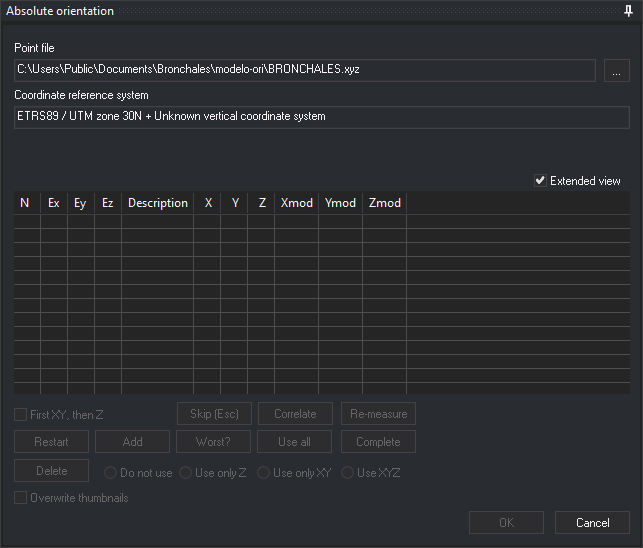
ABSOLUTE_ORI opens Absolute orientation, where you measure control points and view orientation residuals. Buttons are disabled when their actions are unavailable.
- Point file: file containing the control points' ground coordinates. ... opens Control point file to change it.
- Coordinate reference system: coordinate system of the point file.
- Extended view: adds each point's ground coordinates (X, Y, Z) and model coordinates (Xmod, Ymod, Zmod) to the list. Digi3D.AI remembers this setting.
- Measured point list: shows each point's name (N), X, Y and Z residuals (Ex, Ey, Ez) and Description. Click a point to move the cursor to it. Double-click to also remeasure it. In each of the Ex, Ey and Ez columns, Digi3D.AI shows in red the cells whose absolute value, rounded to the decimals the cell shows, is the largest in the column (all tied cells), unless that value is 0.
- First XY, then Z: measures each point in two steps: the first data input records its plan position and the second records Z.
- Skip (Esc): while waiting for a point measurement, skips that point and moves to the next. With a point selected in the list, clears selection.
- Correlate: runs CORRELATE to adjust the position in the other image automatically.
- Re-measure: moves the cursor to the selected point for remeasurement.
- Restart: remeasures every point in turn.
- Add: measures a new point. Opens Enter a terrain point of the point file to select it.
- Worse?: selects the point with the largest residual. Requires at least three measured points.
- Use all: uses X, Y and Z of every measured point again.
- Complete: goes through the file's points that remain unmeasured.
- Delete: removes the selected point and recalculates the orientation.
- Do not use, Use on Z, Use on XY and Use on XYZ: choose which coordinates of the selected point participate in the calculation.
- Overwrite thumbnails: when measuring a point, Digi3D.AI saves a thumbnail of each image in the project's thumbnail folder. Checked, replaces existing thumbnails; unchecked, creates only missing ones.
- OK: saves the orientation and ends the command. Available only with enough points to calculate it.
- Cancel: ends the command without saving the orientation.
Command characteristics
| Command type | Interactive command |
|---|---|
| Repeats automatically | No |
| Menu option | Photogrammetric window/Absolute orientation (option added by the conical camera sensor) |
| Toolbar | This command has no associated toolbar button |
| Extension | Digi3D.ConicSensor.dll |
| Implementation | Native |
| Related variables | No related variables |
| Related commands | INNER_ORI_R INNER_ORI_L RELATIVE_ORI |
| Internal name | {08BBBC9A-950E-4701-A953-A6582BF75729} |