Toolbox
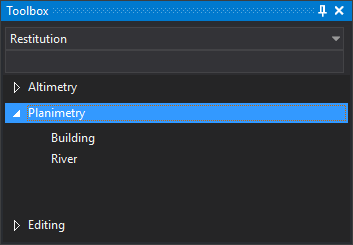
This pane shows the toolbox configured in the active code table.
Pane areas
The pane has three parts:
- A folder selection drop-down.
- A search box filtering the main contents.
- Main contents showing categories and their options.
The drop-down and search box are disabled until a code table is loaded.
Selecting a folder shows all its categories, each containing options.
Search
Typing in the search box shows only options whose titles or tags contain the text, ignoring case. Categories with no matching options are hidden.
Running an option
Clicking an option runs its configured commands:
- One command: runs that command.
- Several commands: runs them in sequence as a macro.
If no drawing window is open, clicking an option displays “Error: No active view found” and runs no commands.
Showing the pane
Show it in either way:
- Click its button on the Panes toolbar.
- Select Window/Toolbox.
Toolbox configuration
Contents are configured in the Toolbox tab of the Code table editor.