Roundabouts
When a roundabout is entered as a new alignment, the program displays a dialog with the selected calculation method enabled and results represented by its center and radius.
Create a roundabout with one of the options on the Horizontal tab.
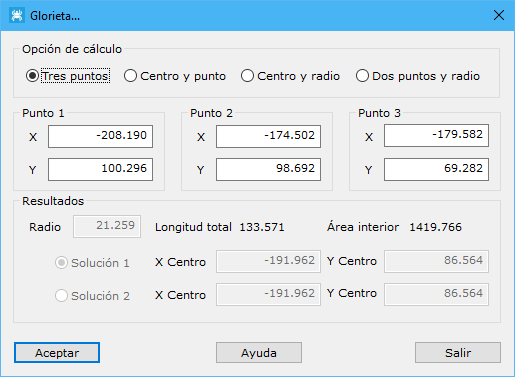
Displayed data:
- Calculation option: method for calculating the new roundabout:
- Three points: three points on the roundabout alignment.
- Center and point: center and a point on the alignment.
- Center and radius: center and radius.
- Two points and radius: two alignment points and radius.
- Point 1, Point 2, Point 3: calculation inputs, enabled or disabled according to the selected method.
- Results: calculated data, acting as inputs or outputs depending on the method:
- Radius: roundabout radius in meters.
- Center coordinates: roundabout center. Two points and radius offers two possible solutions; choose the desired one.
- Total length: alignment length in meters.
- Inner area: area enclosed by the alignment, in square meters.
Accepting the calculated data opens a dialog showing the new roundabout alignment's vertices and tangent points.