Get sequential alignment points
This tool extracts sequential points from a horizontal alignment and its vertical alignment, producing a point file for surveying setting out.
Select an existing alignment when prompted. A dialog displays its properties.
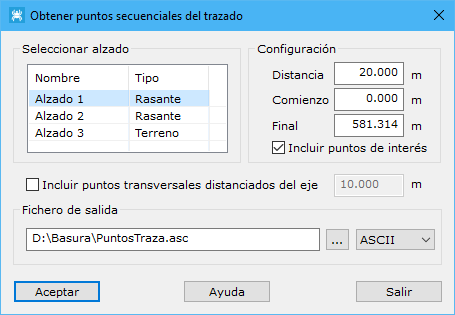
Fields:
- Select vertical alignment: chooses the vertical alignment supplying point elevations.
- Interval: spacing along the alignment between sequential points, in meters.
- Start: starting chainage for point extraction.
- End: ending chainage for point extraction.
- Include original points: includes characteristic alignment points, such as straight alignment vertices lying on the alignment and tangent points.
- Add points in cross section far away from axis: generates points at the specified perpendicular distance from the axis, within the cross section.
- Output file: output file name. Use the button to the right to locate it in Windows Explorer. Farther right, choose TopCal or ASCII format.