Database editor 1,2,3,4
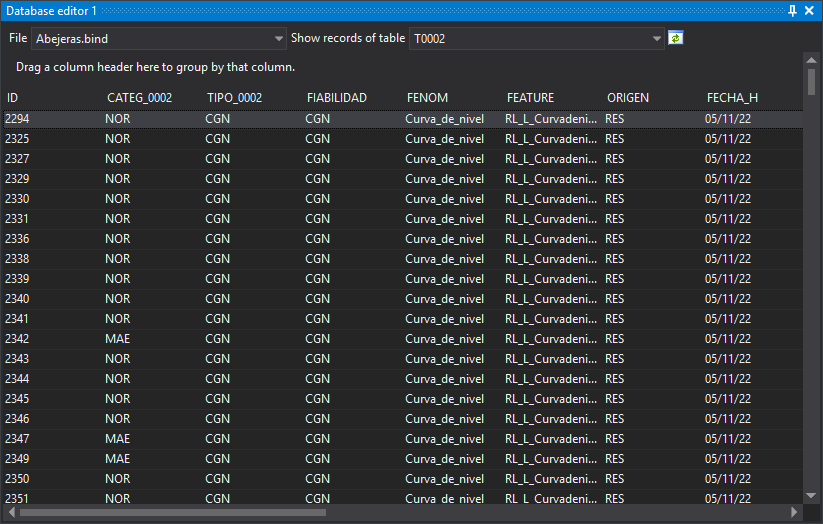
Queries and edits the database connected to a drawing file.
Four identical panes (Database editor 1 through 4) let you view several tables at once.
Toolbar
- File: drawing file whose database is shown. The drop-down contains the main drawing file and loaded reference files.
- Show table registers: database table whose records are shown.
- Python expression: appears only if Display geometries complying with Python expression is selected under Tables/Records to show. Shows records of geometries matching the expression.
- Regenerate: rereads the selected table's records. Enabled when a table is selected.
Records
Each row is a record and each column a field. Drag a column header to the upper area to group records by that field.
- Double-clicking a record makes the drawing window perform Action on double-click and temporarily select its linked geometry for 2 seconds.
- Right-clicking records shows Send selection to the active command. Enabled only if the active command supports geometry selection. Sends geometries linked to the first selected record to the command.
- Values are editable only with Allow editing the database enabled. A read-only database remains uneditable even with that option enabled.
- Each changed value is written to the database when the cell is validated.
Displayed tables and records depend on Tables/Records to show.
Showing the pane
Show it in any of these ways:
- Click its button on the Panes toolbar.
- Select Database/Database editor 1 through Database/Database editor 4.
- Press Alt+Shift+E for Database editor 1.