CUT_AND_DELETE
Split an element into two elements, then delete one of them.
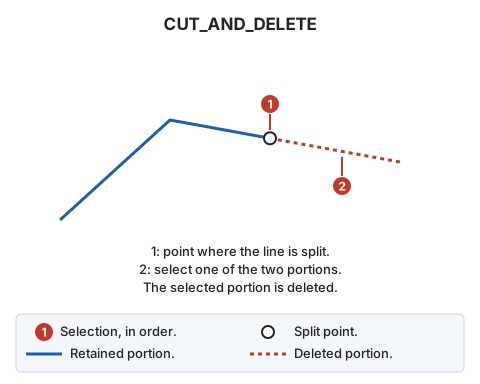
Parameters
Does not accept parameters.
If quality control rejects either new portion, the original entity is preserved whole, and no portions are added.
Command characteristics
| Command type | Interactive command |
|---|---|
| Repeats automatically | Yes |
| Menu option | Edit/Polylines/Split a polyline and delete one of the two ends |
| Toolbar | Leave |
| Extension | DigiNG.OrdenesStandard.dll |
| Implementation | Native |
| Related variables | REPEAT — repeat the last command executed |
| Related commands | CUT_2P CUT_E |
| Internal name | {2D4EAA24-227B-40E4-9E9A-2D189706CD40} |