Select codes for topology
Adds codes of geometries (lines and centroid text) participating in a topology.
Opened by Add and Modify in the topology code list. Accepting adds all listed codes with the same settings (relationship, exclusion expression, Z coordinates, etc.). With Modify, the list contains the edited code and Clear, Remove and Add... are disabled.
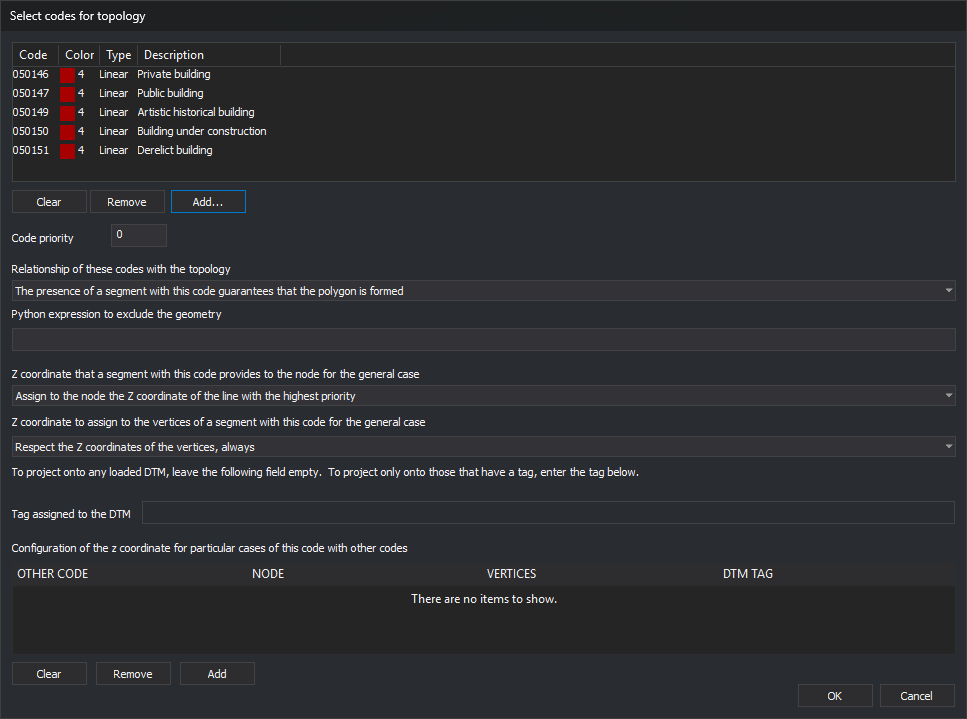
Codes to add
Codes added when the dialog is accepted.
- Clear: empties the list.
- Remove: deletes the selected code.
- Add...: opens Select codes and adds chosen codes.
Code priority
Integer. A line with several topology codes uses settings from the highest-priority code. Node option Assign to the node the Z coordinate of the line with the highest priority compares this value between two sections.
Relationship of these codes with the topology
Whether a line with one of these codes ensures polygon formation:
- A section with this code must exist to form the polygon: analysis includes a topological polygon only with at least one such section.
- The presence of a section with this code guarantees that the polygon is formed: analysis includes a polygon with at least one such section.
- The presence of a section with this code does NOT guarantee that the polygon is formed: a region formed only by lines with this code is ignored.
- The presence of a section with this code does NOT guarantee that the polygon is formed, but it does guarantee holes: as above, but regions formed with these lines count as holes.
Python expression to exclude the geometry
Evaluated for each line with a listed code during polygon formation. True excludes it from topological polygons. An empty expression excludes nothing.
Z coordinate that a section with this code provides to the node for the general case
Used when the topology's Polygon Z coordinates comes from polygon geometries. Determines the Z of a node where this section meets another:
- Assign to the node the Z coordinate of the line with the highest priority
- Assign to the node the Z coordinate of the section with this code
- Assign to the node the Z coordinate of the other section
- Assign to the node the maximum Z coordinate between the two sections
- Assign to the node the minimum Z coordinate between the two sections
- Assign to the node the centroid coordinate
- Interpolate
- Assign to the node the coordinates obtained by projecting its coordinates on the loaded DTMs.
Z coordinate to assign to the vertices of a section with this code for the general case
Each option combines an action and condition:
- Actions: Respect the Z coordinates of the vertices, Interpolate between the two nodes of the section, Assign the centroid Z coordinate and Project on a loaded DTM.
- Conditions: always, if the section coincided in Z at both ends, if the section coincided in Z at least at one end and if the winning Z coordinate at both nodes was that of this section.
Tag assigned to the DTM
Enabled only if nodes or vertices are projected onto a DTM. Empty uses any loaded DTM; a tag restricts projection to DTMs with that tag.
Configuration of the z coordinate for particular cases of this code with other codes
Exceptions to the general node rule when this code meets another. Add opens Add particular case for Z treatment between sections; Remove deletes the selected case; Clear deletes all.