Photogrammetric window
Overview of photogrammetric window operation
The photogrammetric window essentially performs these tasks:
- Changes the ground coordinate.
- Displays images at a given position.
- Notifies the drawing window of user actions, for example: the user has moved, pressed the data pedal, released the snap pedal, ...
- Waits for another user action and repeats this process.
Step 1: Changing the ground coordinate
The photogrammetric window has a coordinate (the ground coordinate). This changes as the user moves the input device and is used to calculate where images should appear in the photogrammetric window.
The photogrammetric window follows these steps to transform the ground coordinate:
- Waits for the user to interact with the input device (topomouse, handwheels, ...).
- Changes the photogrammetric window's coordinates according to the user's action (moving the topomouse by the equivalent of one meter along X changes the window's ground coordinates by one meter along X).
Step 2: Displaying images at a given position
The photogrammetric window does not perform the mathematical operations determining which pixel of each image should appear at the screen center for a ground coordinate.
The window displays images and delegates image position calculation to the loaded sensor. For a ground coordinate, it asks the sensor for the pixel coordinates on which to center each image. On receiving them, the photogrammetric window displays images at the position calculated by the sensor.
If you load a conic camera sensor, it performs the operations needed to transform the ground coordinate into left and right image pixel coordinates. If you load a satellite sensor, it performs the same transformation using different operations. Because each sensor handles the ground-to-pixel transformation, adding a new sensor does not require modifying the main application.
The photogrammetric window follows these steps to display images:
- If the photogrammetric model has an assigned orientation (absolute, affine, ...), the window transforms the ground coordinate through that orientation (absolute or affine) to obtain the coordinate to send to the sensor. If no orientation is assigned, the coordinate to send to the sensor is set to the ground coordinate.
- The window uses the coordinate to send to the sensor to ask the loaded sensor (orthophoto, stereo conic camera, satellite, ADS, ...) where to display images in the photogrammetric window.
- The sensor returns pixel coordinates that should appear at the window center.
- The photogrammetric window displays images, ensuring that the pixel coordinates returned by the sensor are at its center.
Step 3: Notifying the drawing window of a user action
If a drawing window is open:
- The photogrammetric window communicates the user's action to the drawing window.
Components with coordinate reference systems
The process described above includes three components with their own coordinate reference systems:
- The ground coordinate. Its coordinate reference system is called the orientation coordinate system.
- The sensor. Its system is called the sensor coordinate reference system.
- The drawing window. Its system is called the drawing window coordinate reference system.
Because the orientation, sensor and drawing window coordinate reference systems can differ, Digi3D.AI transforms coordinates between them. The following steps include those transformations:
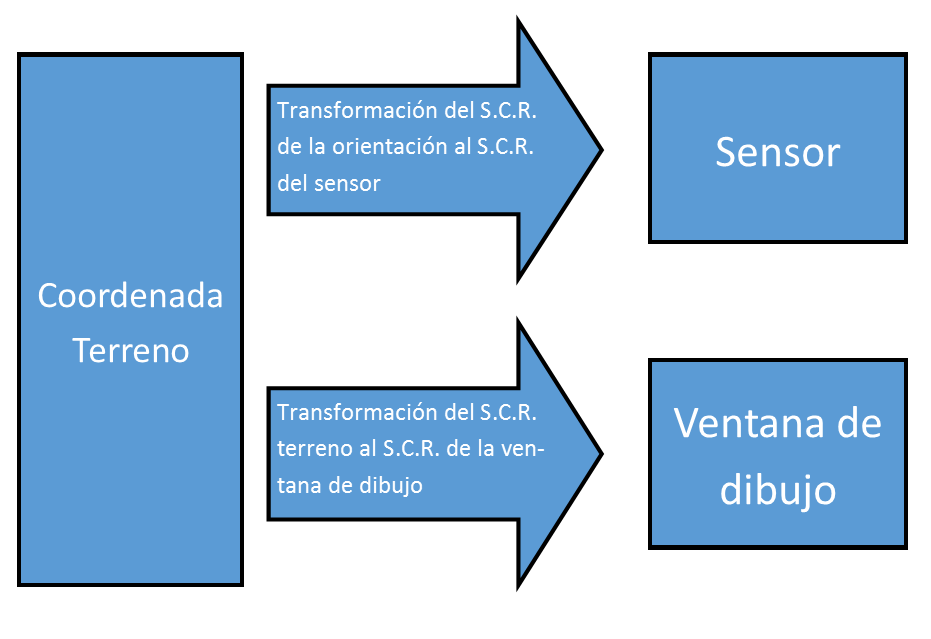
Displaying images at a position:
- If the photogrammetric model has an assigned orientation (absolute, affine, ...), the window transforms the ground coordinate through that orientation (absolute or affine) to obtain the coordinate to send to the sensor. If no orientation is assigned, the coordinate to send to the sensor is set to the ground coordinate.
- The coordinate obtained in the previous step is transformed from the orientation's coordinate reference system to the sensor's coordinate reference system.
- The photogrammetric window uses the coordinate to send to the sensor to ask the loaded sensor (orthophoto, stereo conic camera, satellite, ADS, ...) where to display images in the photogrammetric window.
- The sensor returns pixel coordinates that should appear at the window center.
- The photogrammetric window displays images, ensuring that the pixel coordinates returned by the sensor are at its center.
Notifying the drawing window of a user action:
If a drawing window is open:
- The photogrammetric window transforms the ground coordinate from the orientation's coordinate reference system to the drawing window's coordinate reference system.
- The photogrammetric window communicates the user's action to the drawing window and sends the coordinates obtained in step 1.