LEAVE
Unload reference files attached to the working file.
Parameters
| Parameter number | Description | Optional |
|---|---|---|
| 1 | Path of the reference file to unload | Yes |
Notes
If no reference files are loaded, the command displays an error message and ends.
If you specify the parameter, the command unloads that reference file without displaying a dialog box. Enclose paths containing spaces in double quotation marks.
Path comparison is case-insensitive. If the path does not match any loaded reference file, an error tone sounds, and no file is unloaded.
Without a parameter, if only one reference file is loaded, the command unloads it directly. If several are loaded, it displays the Leave dialog box.
When unloading a reference file:
- The command also unloads all loaded topologies, even when the parameter's path does not match any loaded file.
- The command removes the file from the list of reference files associated with the drawing file. That reference file is no longer loaded when you reopen the drawing file.
- If the file is not open as read-only, contains entities marked as deleted, and its format stores that flag within the file itself, Digi3D.AI asks whether to compress it: "There are entities marked as deleted that have not been removed yet: (…) Do you want to compress now?" Yes compresses and unloads the file. No unloads it without compressing. Cancel cancels unloading that file.
Leave dialog box
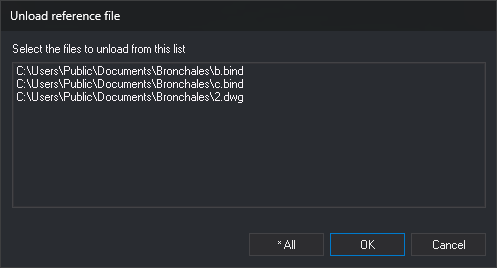
Select the reference files to unload in this dialog box.
- Select the files to be left from this list: loaded reference files, with their full paths. The drawing file is not listed. Each click on a file selects or deselects it without holding Ctrl or Shift.
- * All: unload all reference files in the list.
- OK: unload the selected files. If no file is selected, nothing happens, and the dialog box remains open.
- Cancel: close the dialog box without unloading any files.
Command characteristics
| Command type | Immediate command |
|---|---|
| Repeats automatically | No |
| Menu option | File/Unload reference file... |
| Toolbar | This command has no associated toolbar button |
| Extension | DigiNG.OrdenesStandard.dll |
| Implementation | Native |
| Related variables | No related variables |
| Related commands | LOAD_F |
| Internal name | {99D6E304-1AE6-4eec-B6E5-D1A438009F11} |