About Digi3D.AI
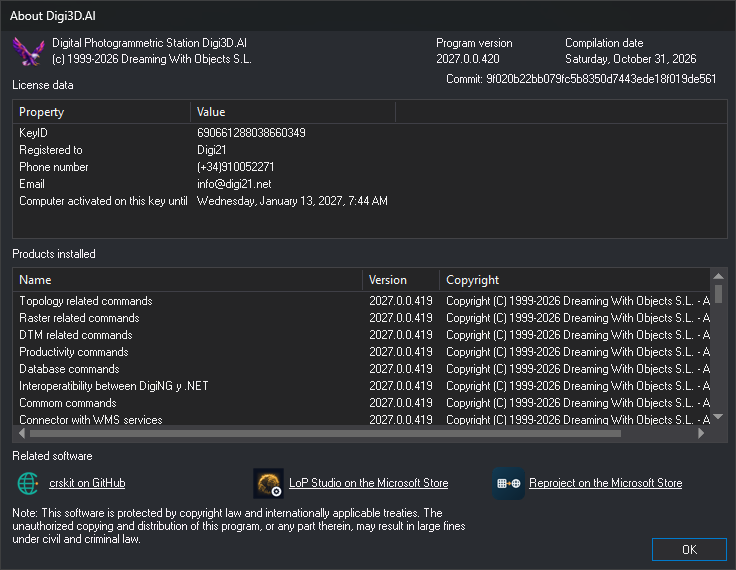
This dialog shows the Digi3D.AI version, license data and loaded extensions. Technical support requests this information to identify the installation.
Opening the dialog
Select Help/About Digi3D....
Fields
- Program version: installed Digi3D.AI version, for example 2027.0.0.417. This is the number in the release notes.
- Compilation date and Commit: identify the exact program build. The commit is the identifier of the source code used to build it.
- License data: dongle properties:
- KeyID: dongle number.
- Registered to, Phone and Email: details of the customer to whom the dongle is registered.
- Computer activated on this key until: date until which this computer is activated on the dongle. This is the maximum date chosen when activating the computer. Absent if the computer is not activated on the dongle.
- In the version of Digi3D.AI that uses Software licenses instead of the protection dongle, check the status of the licenses in the Software licenses dialog, which you open with Help/Software licenses....
- Products installed: the program and each loaded extension (commands, importers and exporters, photogrammetric window sensors and input devices), with name, version and copyright. The version in some Products installed rows, including Digital Photogrammetric Station Digi3D.AI, may be earlier than Program version.
- Related software: other Digi21 programs. Each link opens its page in the browser:
- crskit on GitHub: repository of crskit, the coordinate reference system library used by Digi3D.AI.
- LoP Studio on the Microsoft Store: LoP Studio's Microsoft Store page, from which it is installed.
- Reproject on the Microsoft Store: Reproject's Microsoft Store page, from which it is installed.
- OK: closes the dialog.