Delete outside or inside boundaries
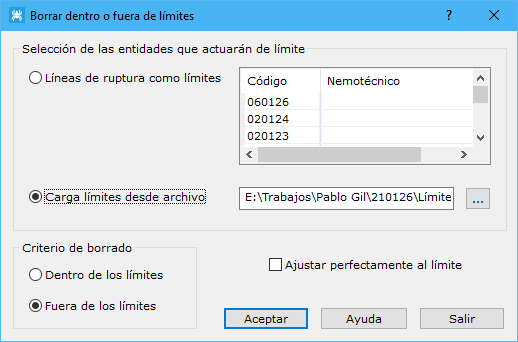
This tool deletes entities inside or outside boundaries. Boundaries can be defined by breaklines belonging to the digital model, or stored as closed lines in drawing files (DIGI, AutoCad or MicroStation format). Use it to delete information where you do not want to perform calculations, such as contours or profile projection. The application displays a dialog with the following fields:
- Selection of the boundaries: two options load entities as boundaries:
- Breaklines like boundaries: loads the entities selected in the list as boundaries. The list shows breaklines in the digital model. These entities must form closed entities for the program to select them as boundaries.
- Load boundaries from file: loads drawing entities stored in a file as boundaries. These entities must be closed.
- Where erase: specifies where to delete triangles, with two options:
- Inside limits: deletes triangles inside the boundaries.
- Outside limits: deletes triangles outside the boundaries.
- Fit to the limit: for a digital model document, enable this option to cut triangles crossed by boundaries loaded from an external file, fitting the cut precisely to those boundaries.