JOIN_NEARBY_VERTICES
Equalize vertex X coordinates and vertex Y coordinates in the active drawing file when they differ by no more than the specified distance.
Parameters
This command takes no parameters.
Notes
Dialog
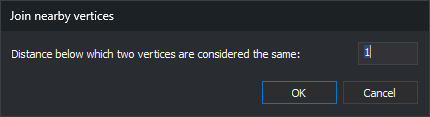
The Join nearby vertices dialog requests the distance:
| Field | Description | Default value |
|---|---|---|
| Distance below which two vertices are considered the same: | Maximum difference, in drawing file units, between two X coordinates or two Y coordinates for them to take the same value | 1 |
The dialog always starts with 1: the command does not save the distance between runs. If the text is not a number, a warning appears and the dialog stays open. Clicking Cancel ends the command without making changes.
How coordinates are joined
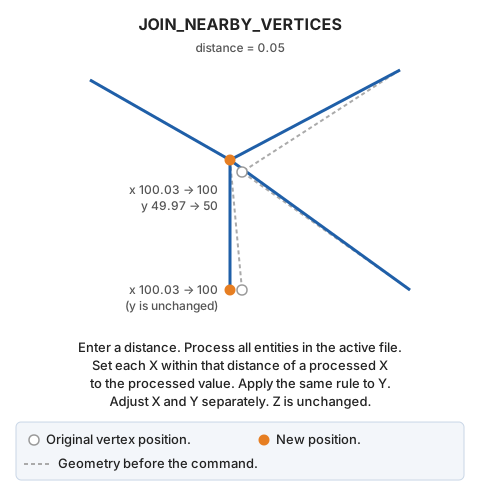
The command visits entities in the active drawing file in file order, skipping deleted entities. For each entity, it processes:
- Its vertices (the insertion point for a point or text entity; the insertion point for a complex entity).
- Hole vertices, if it is a polygon.
- Vertices of the entities forming a complex entity. Holes of polygons inside a complex entity and entities inside a nested complex entity are not processed.
X and Y coordinates are handled separately. Each X is compared with previously processed X values: if one differs by no more than the specified distance, that value is assigned to X. Otherwise, X is retained and added to the processed X values. The same applies to Y. Consequently:
- Distant vertices whose X values differ by no more than the distance receive the same X even if their Y values differ greatly.
- The retained value belongs to the vertex processed earlier, so the result depends on entity order in the file.
Z does not change. A negative distance leaves all coordinates unchanged.
Result
The command replaces each entity with a corrected copy if any X or Y coordinate changed. Other entities remain untouched. If no entities change, the active drawing file is not modified. No completion message appears.
Command characteristics
| Command type | Immediate command |
|---|---|
| Repeats automatically | No |
| Menu option | Geometric analysis/Join nearby vertices... |
| Toolbar | This command has no associated toolbar button |
| Extension | DigiNG.OrdenesTopologia.dll |
| Implementation | Native |
| Related variables | No related variables |
| Related commands | JOIN |
| Internal name | {8312B2CC-7C50-456A-81A0-36737CE1B41C} |