Configuration of input devices
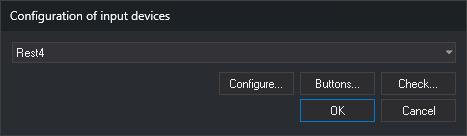
This dialog selects the input device used for digitizing in the photogrammetric window (handwheels, pedals, 3D mice, etc.), configures it, and checks that it communicates with Digi3D.AI.
This differs from the Input devices section of the Configuration dialog.
Opening the dialog
Select Tools/Configuration of input devices... from the menu. This option only appears in the menu Digi3D.AI displays when no drawing or photogrammetric window is open.
The dialog also opens when opening a photogrammetric window if Digi3D.AI cannot communicate with the selected input device. In that case, Error when connecting to input device appears, with three options:
- Attempt to connect again to device %1.: tries communicating again.
- Configure input device.: opens this dialog. On closing it, Digi3D.AI tries communicating with the selected device.
- Continue.: opens the photogrammetric window without an input device.
Fields
- Drop-down list: input devices supported by the installed extensions. None means no input device is used.
- Configure...: opens the selected device configuration dialog. Disabled if the device has no parameters to configure.
- Buttons...: opens Button assignment.
- Check...: opens Encoder test.
- OK: saves the selected device and closes the dialog.
- Cancel: closes the dialog without changing the device.
Configure..., Buttons..., and Check... are disabled when None is selected.
Buttons... and Check... communicate with the device before opening their dialogs. If communication fails, Digi3D.AI displays Error when connecting to input device with the error description, and the dialog does not open.
Configure: device parameters
Each device has its own configuration dialog. Devices connected through a serial port (Rest4, FCodic, TopoMouse Serie, and SEC-232m) display Parameters for serial cards:
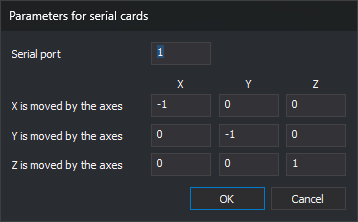
- Serial port: number of the COM port to which the device is connected.
- X is moved by the axes, Y is moved by the axes, and Z is moved by the axes: how much each cursor coordinate (rows) changes when moving each device axis (X, Y, and Z columns). A negative value reverses the direction. For example,
-1in the Z row and Z column makes the Z handwheel move the cursor in the opposite direction.
Other device dialogs have the same axis table and, in the first row, the parameter specific to each device:
| Device | Dialog | First row |
|---|---|---|
| COMBox | COMBox settings | Serial port |
| IBox | IBox settings | Serial port. Adds The device is a Softmouse or a Stealth 3D Mouse, which rotates the device X and Y axes by 45°. |
| DPW | Parameters for PCI cards | Read the card every n milliseconds: time between card readings. |
| DPW-USB | DPW-USB settings | Read the device every n milliseconds: time between device readings. |
| UDP/IP | Parameters for UDP/IP | Port: UDP port on which Digi3D.AI receives coordinates. |
| Stealth 3D Mouse S1Z/S2Z/S3Z | Stealth 3D Mouse device configuration | None: only the axis table, whose rows are X affected by axes, Y affected by axes, and Z affected by axes. |
| TopoMouse USB | TopoMouse USB device configuration | None: only the axis table, whose rows are X affected by axes, Y affected by axes, and Z affected by axes. |
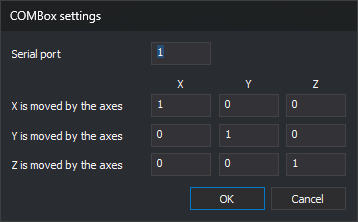
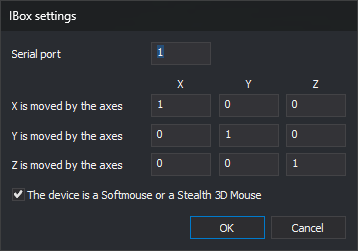
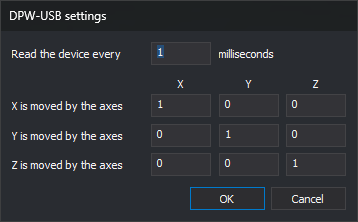
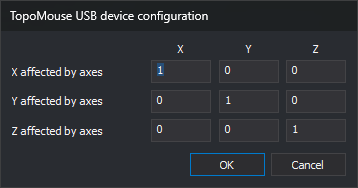
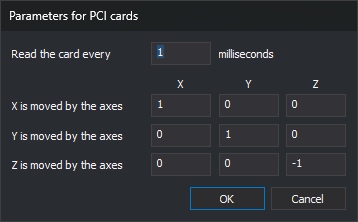
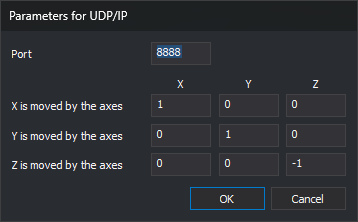
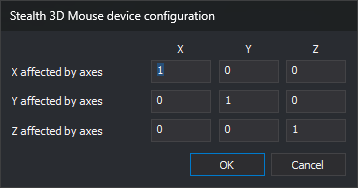
If a device configuration has never been saved, the dialog displays the device defaults. OK saves the values, and Cancel closes the dialog without saving them.
Each device saves its configuration separately. Stealth 3D Mouse and TopoMouse USB configuration is saved for the Windows user; other device configuration is saved for the computer.
Buttons: Button assignment

- Press a device button or pedal. Command assigned to button opens, as described in Programming buttons.
- Choose the action or command that the button runs and click OK.
- Repeat for each button you want to program.
- Press Esc to finish.
Each assignment is saved when you click OK in Command assigned to button. Clicking Cancel in Configuration of input devices does not undo assignments.
Check: Encoder test
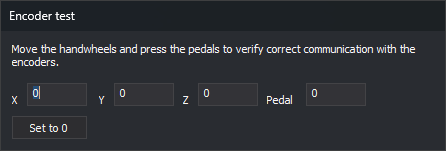
Displays the X, Y, Z, and Pedal values sent by the device. Move the handwheels and press the pedals to check that the values change. Set to 0 resets the counters to zero. The dialog has no close button: close it with Esc.
Notes
- The selected device is saved for the Windows user, rather than the computer.
- To configure mice, joysticks, and controllers detected by Windows as HID devices, use Mouse, joystick, and controller configuration.
Where it is stored
The selected device is saved in the Windows registry for the user:
| Registry | HKEY_CURRENT_USER\Software\Digi21\Digi3D.NET\App\Configuration |
|---|---|
| Value | Codificadores |
| Type | REG_SZ (device name, as displayed in the drop-down list) |
| Default value | (empty): no device |
Stealth 3D Mouse and TopoMouse USB parameters are also saved in the Windows registry for the user. They are three REG_SZ values, TensorX, TensorY, and TensorZ, containing the axis table rows as numbers separated by spaces:
| Device | Registry key |
|---|---|
| Stealth 3D Mouse S1Z/S2Z/S3Z | HKEY_CURRENT_USER\Software\Digi21\Digi3D.NET\Digi3D\IO\Digi3D.IO.S1Z |
| TopoMouse USB | HKEY_CURRENT_USER\Software\Digi21\Digi3D.NET\Digi3D\IO\Digi3D.IO.TopoMouseUsb |
The defaults are 1 0 0 0 for TensorX, 0 1 0 0 for TensorY, and 0 0 1 0 for TensorZ.
Other device parameters are shared by all computer users and saved in the Digi3DNET.db configuration file, in one folder per device. These SQL statements set serial port 3 for IBox, whether or not the row exists. Run them in Advanced configuration and restart Digi3D.AI:
INSERT OR IGNORE INTO Keys (Path) VALUES ('Digi3D\IO\TarjDigi3D\IBox');
DELETE FROM Ints WHERE Value = 'PuertoSerieCodificadores' AND Key = (SELECT Id FROM Keys WHERE Path = 'Digi3D\IO\TarjDigi3D\IBox');
INSERT INTO Ints (Key, Value, Data) SELECT Id, 'PuertoSerieCodificadores', 3 FROM Keys WHERE Path = 'Digi3D\IO\TarjDigi3D\IBox';
Folder Digi3D\IO\TarjDigi3D\<dispositivo>
<dispositivo> is the name of the configured input device (generic serial card, ISA, DPW USB, etc.). The following folders, named after individual devices, contain the same values.
| Value | Table | Default | What it does |
|---|---|---|---|
BombardeoCodificadores |
Ints |
1 | Milliseconds between device encoder readings. |
PuertoSerieCodificadores |
Ints |
1 | Device serial port number. |
TensorX |
Texts |
depends on the device | X row of the matrix transforming encoder readings into displacements. Four space-separated numbers. |
TensorY |
Texts |
depends on the device | Y row of the matrix transforming encoder readings into displacements. |
TensorZ |
Texts |
depends on the device | Z row of the matrix transforming encoder readings into displacements. |
Folder Digi3D\IO\TarjDigi3D\DatEmComBox
| Value | Table | Default | What it does |
|---|---|---|---|
PuertoSerieCodificadores |
Ints |
1 | Device serial port number. |
TensorX |
Texts |
depends on the device | X row of the matrix transforming encoder readings into displacements. Four space-separated numbers. |
TensorY |
Texts |
depends on the device | Y row of the matrix transforming encoder readings into displacements. |
TensorZ |
Texts |
depends on the device | Z row of the matrix transforming encoder readings into displacements. |
Folder Digi3D\IO\TarjDigi3D\DPW
| Value | Table | Default | What it does |
|---|---|---|---|
BombardeoCodificadores |
Ints |
1 | Milliseconds between device encoder readings. |
TensorX |
Texts |
depends on the device | X row of the matrix transforming encoder readings into displacements. Four space-separated numbers. |
TensorY |
Texts |
depends on the device | Y row of the matrix transforming encoder readings into displacements. |
TensorZ |
Texts |
depends on the device | Z row of the matrix transforming encoder readings into displacements. |
Folder Digi3D\IO\TarjDigi3D\DPWUsb
| Value | Table | Default | What it does |
|---|---|---|---|
BombardeoCodificadores |
Ints |
1 | Milliseconds between device encoder readings. |
TensorX |
Texts |
depends on the device | X row of the matrix transforming encoder readings into displacements. Four space-separated numbers. |
TensorY |
Texts |
depends on the device | Y row of the matrix transforming encoder readings into displacements. |
TensorZ |
Texts |
depends on the device | Z row of the matrix transforming encoder readings into displacements. |
Folder Digi3D\IO\TarjDigi3D\IBox
| Value | Table | Default | What it does |
|---|---|---|---|
DispositivoEsMouse |
Ints |
1 | If 1, IBox works as a mouse. |
PuertoSerieCodificadores |
Ints |
1 | Device serial port number. |
TensorX |
Texts |
depends on the device | X row of the matrix transforming encoder readings into displacements. Four space-separated numbers. |
TensorY |
Texts |
depends on the device | Y row of the matrix transforming encoder readings into displacements. |
TensorZ |
Texts |
depends on the device | Z row of the matrix transforming encoder readings into displacements. |
Folder Digi3D\IO\TarjDigi3D\SEC-232m
| Value | Table | Default | What it does |
|---|---|---|---|
PuertoSerieCodificadores |
Ints |
value of Digi3D\IO\TarjDigi3D\PuertoSerieCodificadores |
Device serial port number. |
TensorX |
Texts |
depends on the device | X row of the matrix transforming encoder readings into displacements. Four space-separated numbers. |
TensorY |
Texts |
depends on the device | Y row of the matrix transforming encoder readings into displacements. |
TensorZ |
Texts |
depends on the device | Z row of the matrix transforming encoder readings into displacements. |
Folder Digi3D\IO\TarjDigi3D\UdpIp
| Value | Table | Default | What it does |
|---|---|---|---|
Puerto |
Ints |
8888 | UDP port on which Digi3D.AI receives coordinates. |
TensorX |
Texts |
depends on the device | X row of the matrix transforming encoder readings into displacements. Four space-separated numbers. |
TensorY |
Texts |
depends on the device | Y row of the matrix transforming encoder readings into displacements. |
TensorZ |
Texts |
depends on the device | Z row of the matrix transforming encoder readings into displacements. |
Button assignments from Buttons... are saved as described in Programming buttons.