File
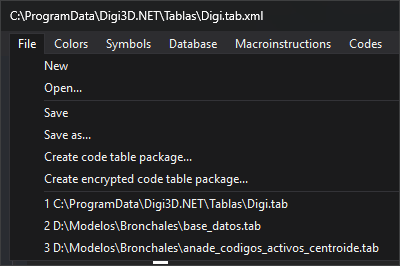
| Option | Action |
|---|---|
| New | Creates an empty code table. Unsaved changes first open You have not saved the changes. |
| Open... | Opens .tab.xml. Unsaved changes first open You have not saved the changes. Opening runs table checks. |
| Save | Saves to the table's file. For a new table, acts as Save as.... |
| Save as... | Saves to another .tab.xml, which becomes the table's file. |
| Create code table package... | Saves a copy as .dt. The open table retains its file association. |
| Create encrypted code table package... | Opens Create Encrypted Code Table Pack. |
| 1, 2... (recent code tables) | Opens that table like Open...: unsaved changes first open You have not saved the changes, then opening runs checks. A missing file displays a warning and is removed. An unavailable drive (unplugged USB or inaccessible network drive) keeps its entry and shows the loading warning. An empty list shows disabled Recent code tables instead. |
Before writing, Save, Save as... and both package options apply pending tab changes without Apply, like OK. Database, Styles and Codes ask whether to apply; other tabs apply without prompting.
Recent code tables
The last 10 tables opened through Open... or this list, or saved through Save as... or You have not saved the changes when it requests a filename. Most recent is 1. Reopening or saving a listed table moves it first. Paths of 260 or more characters are not added. Long menu paths are abbreviated with ....
Selecting a missing file or a directory displays this warning and removes the entry:
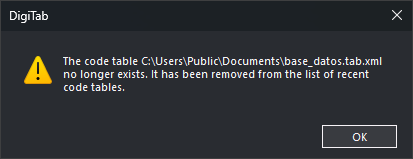
Other failures, such as an unavailable drive or missing access permission, retain the entry.
The list is saved for your Windows user across editor sessions.