SPEED
Changes the plotter's speed.
Parameters
| Parameter | Real number |
|---|---|
| X and Y speed | No |
| Z speed | No |
Notes
The photogrammetric window has one speed for the XY plane and another for the Z axis.
Command format:
SPEED=[xy] [z]
If you omit the Z speed, it is set to the XY speed.
With no parameters, prompts for both speeds in Speed of input device, initially showing the current speeds.
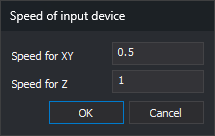
- Speed for XY: movement speed in the XY plane.
- Speed for Z: movement speed along the Z axis.
OK displays a message and leaves the dialog open if either field is nonnumeric. Cancel leaves speeds unchanged.
Assigned speeds are saved in the user configuration (registry values VelocidadXY and VelocidadZ) and shown in the photogrammetric window's status bar.
The Restart menu option runs SPEED=1.0 1.0.
Examples:
SPEED=5.75
Sets the factors multiplying movement in the XY plane and along Z to 5.75.
SPEED=5.75 4.22
Sets the factor multiplying movement in the XY plane to 5.75 and the factor for Z to 4.22.
Command characteristics
| Command type | Interactive command without parameters; immediate command with parameters |
|---|---|
| Repeats automatically | No |
| Menu option | Photogrammetric window/Speed/Assign speed... Photogrammetric window/Speed/Restart |
| Toolbar | This command has no associated toolbar button |
| Extension | Digi3D.CommonCommands.dll |
| Implementation | Native |
| Related variables | No related variables |
| Related commands | SCALE_SPEED SPEED_INCR_XY SPEED_INCR_Z SPEED_DECR_XY SPEED_DECR_Z |
| Internal name | {3BE1084C-E1BC-4b4f-AD45-611112560D6B} |