Unable to load the code table
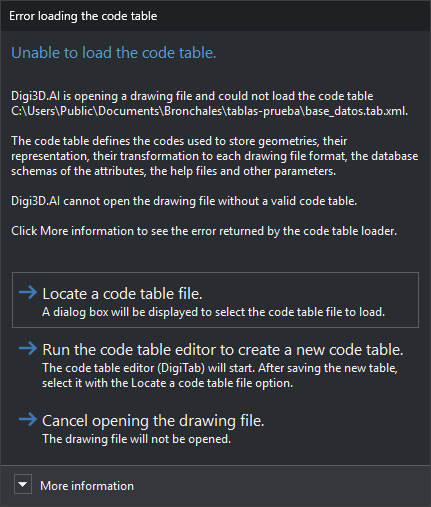
Digi3D.AI displays this dialog when opening a drawing file if its specified code table cannot be loaded. The contents show the code table path with placeholders already resolved.
Possible causes include:
- The code table file does not exist.
- The file is not valid XML. The error identifies the line and column.
- The code table has no color palette, styles or codes.
- The code table is encrypted and the dongle has no license to use it, or the license has expired.
Contents
- More information: error text returned by the code table loader.
Buttons
Neither Esc nor the window close button can close the dialog: you must choose one of these buttons.
- Locate a code table file.: opens a dialog to select a
.tab.xmlor.dtfile. Digi3D.AI tries loading the selected table. Cancelling selection retries the same code table; if loading fails, this dialog reappears. - Run the code table editor to create a new code table.: runs the code table editor (DigiTab) and retries loading the same code table, so this dialog reappears. After saving the new table in the editor, click Locate a code table file. and select it.
- Cancel opening the drawing file.: the drawing file is not opened.